
Zusammenarbeit ist für globale Skalierung unerlässlich, aber Datensicherheit hat oberste Priorität. MultiLipis Team-Arbeitsbereich ermöglicht es Ihnen, Zugriff für Übersetzer, Entwickler und Projektmanager bereitzustellen, ohne sensible Anmeldedaten weiterzugeben. Sie können zuweisen detaillierte Berechtigungen , wodurch sichergestellt wird, dass Teammitglieder nur mit den spezifischen Projekten und Tools interagieren, die für ihre Rolle erforderlich sind.
Diese Vorlage behandelt den Lebenszyklus der Benutzerverwaltung: Bereitstellung , Prüfung , und Entzug der Berechtigungen .
Rollenbasierte Zugriffskontrolle (RBAC)
Teilen Sie niemals Ihre Master-Zugangsdaten. Erstellen Sie stattdessen individuelle Konten mit Berechtigungen, die auf die Verantwortlichkeiten jedes Benutzers zugeschnitten sind. Dies gewährleistet vollständige Audit-Trails und die Möglichkeit, den Zugriff sofort zu widerrufen, wenn Teammitglieder wechseln.
1. Zugriff auf das Teamverzeichnis
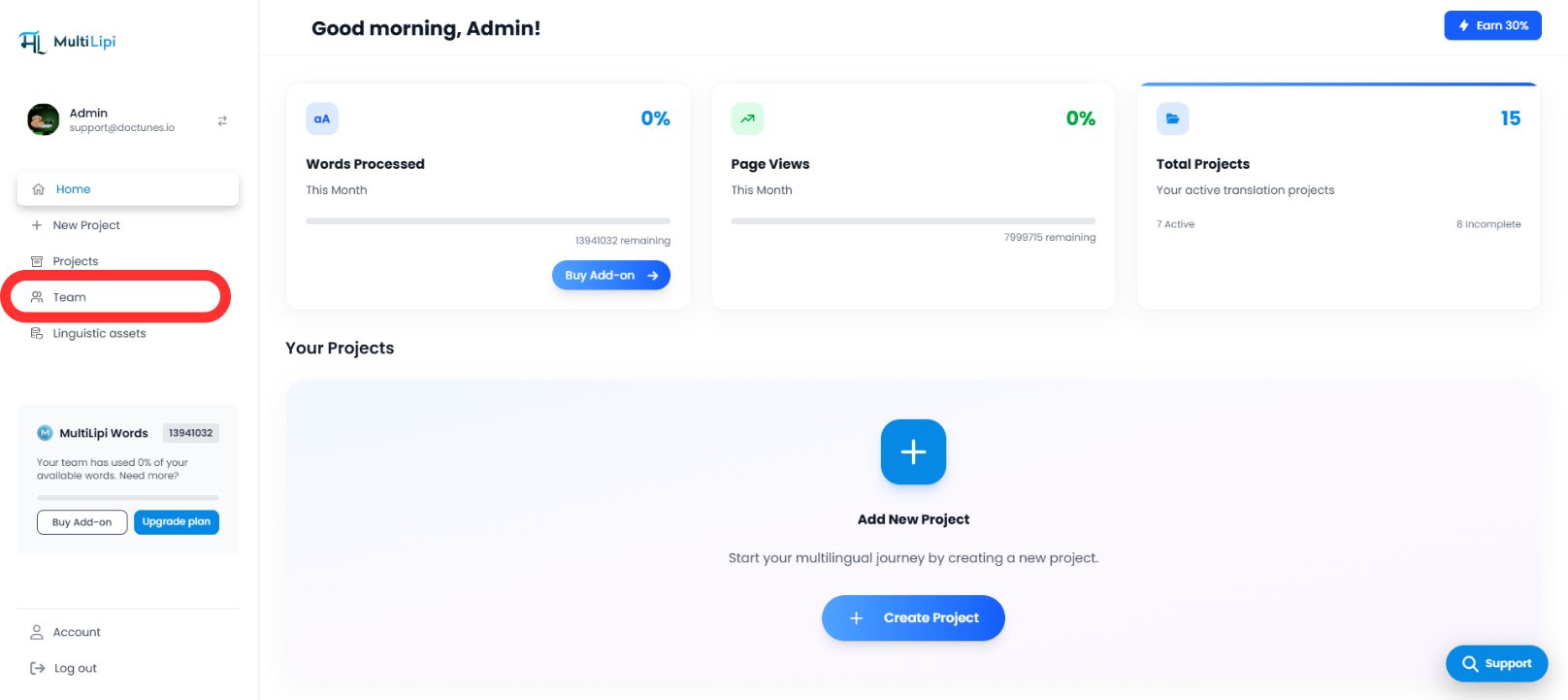
Der Tab "Team" dient als zentrale Kommandozentrale für alle Benutzerberechtigungen.
Navigieren
Wählen Sie in der Seitenleiste Ihres MultiLipi-Dashboards Team .
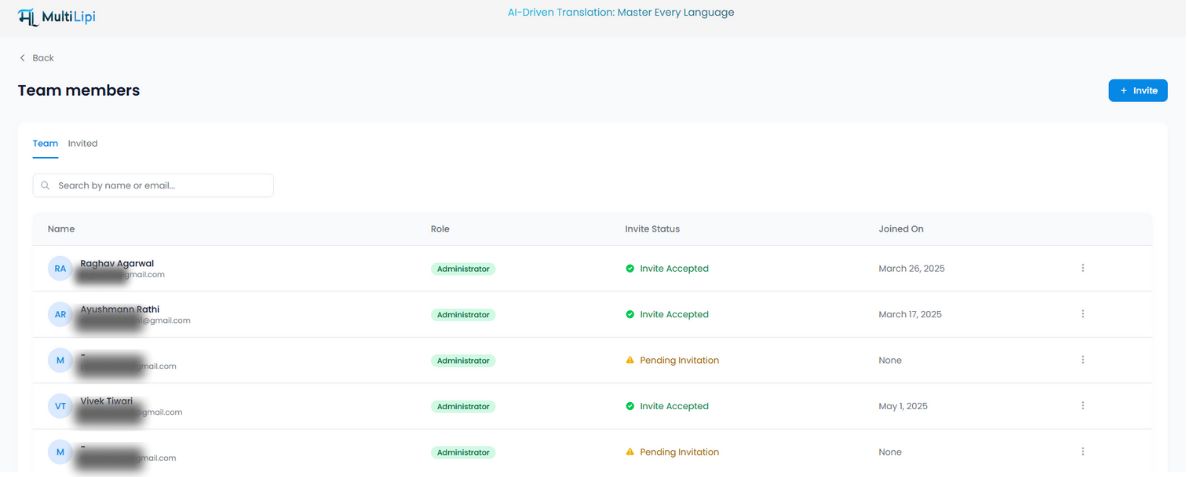
Audit-Ansicht
Sie sehen eine einheitliche Tabelle mit allen aktiven Benutzern, ihren zugewiesenen Rollen, dem Zugriffsumfang (spezifische Domänen) und dem aktuellen Status ( Aktiv vs. Ausstehende Einladung ).
2. Zugriffsberechtigungen (Mitglieder einladen)
So nehmen Sie einen neuen Mitarbeiter auf:
Einladung initiieren
Klicken Sie auf die Einladen Schaltfläche in der oberen rechten Ecke des Arbeitsbereichs.
Anmeldeinformationen definieren
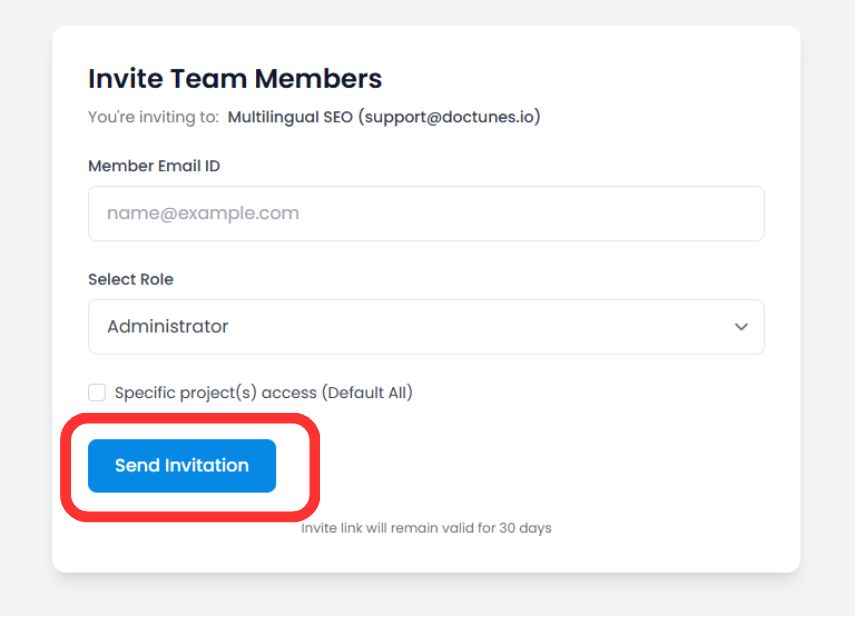
Geben Sie die geschäftliche E-Mail-Adresse des Benutzers ein.
Rollen Zuweisung
Wählen Sie die entsprechende Berechtigungsstufe (z. B. Administrator für die volle Kontrolle, Mitarbeiter nur für die Übersetzungsbearbeitung).
Projektumfang (Optional)
Beschränken Sie den Benutzer auf bestimmte Domänen (z. B. "Übersetzer A" nur für das deutsche Projekt zuweisen).
Einladung bereitstellen
Klicken Sie auf Per E-Mail einladen .
Sicherheitshinweis
Der sichere Einladungslink läuft automatisch ab in 30 Tage um unbefugten Zugriff von veralteten Links zu verhindern.
3. Verwaltung von Zugriffslebenszyklen
Governance ist ein fortlaufender Prozess. Sie können Berechtigungen sofort ändern oder widerrufen, wenn sich Teamstrukturen ändern.
Rollen ändern (Die Funktion "Bearbeiten")
Wenn ein Benutzer erhöhte Berechtigungen oder Zugriff auf ein neues Projekt benötigt:
Suchen Sie den Benutzer im Team Tabelle.
Klicken Sie auf die Drei Punkte (⋮) Symbol in der Spalte Aktionen.
Wählen Sie Bearbeiten .
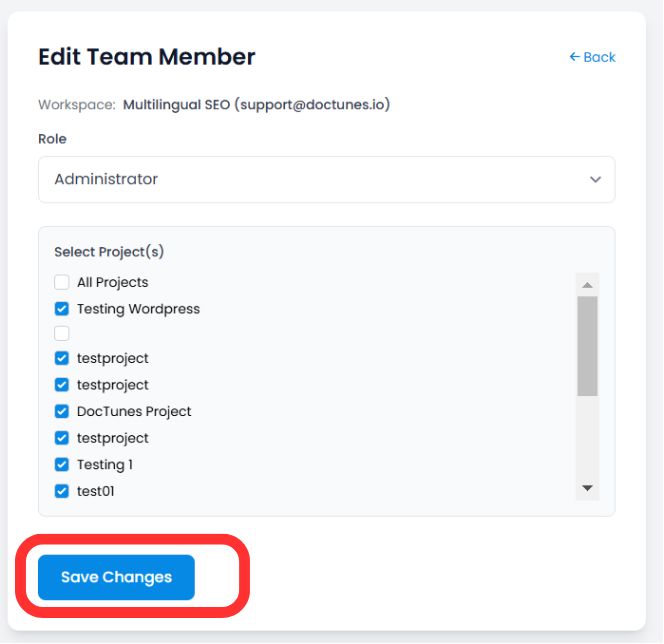
Aktualisieren Sie deren Rolle or Projektzuweisung und klicken Sie auf Änderungen speichern . Die neuen Berechtigungen werden sofort wirksam.
Zugriff entziehen (Offboarding)
Wenn ein Teammitglied geht oder ein Vertrag endet, sichern Sie sein Konto sofort:
Schritt 1
Klicken Sie auf die Papierkorb-/Entfernen-Symbol in der Spalte Aktionen.
Schritt 2
Entfernung bestätigen.
Auswirkung
Die Sitzung des Benutzers wird beendet und er verliert den Zugriff auf das Dashboard sofort .
Zusammenfassung: Best Practices für die Zusammenarbeit
| Aktion | Beste Vorgehensweise |
|---|---|
| Rollen Zuweisung | Benutzen Sie die Prinzip der geringsten Rechte . Gewähren Sie nur vertrauenswürdigen Stakeholdern Administratorzugriff. |
| Projektumfang | Externe Agenturen auf spezifische Projekte beschränken, um zu verhindern, dass sie auf nicht zusammenhängende Daten zugreifen. |
| Regelmäßige Audits | Überprüfen Sie den Tab "Team" monatlich um inaktive Benutzer oder ausstehende Einladungen zu entfernen. |
🔒 Sicherheit in großem Maßstab: Durch die Implementierung von granularem RBAC stellen Sie sicher, dass Ihre Übersetzungsvorgänge global skalierbar sind, ohne die Datenintegrität zu beeinträchtigen oder sensible Projektinformationen unbefugten Teammitgliedern preiszugeben.