So aktivieren Sie das Limit für Seitenaufrufe und Wörter in MultiLipi
 MultiLipi
•
7. Juli 2025
•
5 Minuten Lesezeit
MultiLipi
•
7. Juli 2025
•
5 Minuten Lesezeit
Manage and control your usage credits for translations and page views with clear, customizable limits.
What Are These Limits?
Ihr MultiLipi-Abonnement beinhaltet einen Freibetrag von:
✅ Page Views Credits – the total number of translated page loads your site can serve within your billing period.
✅ Words Credits– die maximale Anzahl von Wörtern, die übersetzt und angezeigt werden können.
Das Page Views Limitund Words Limit settings let you define caps for these metrics so you can better monitor and control consumption.
Why Use These Limits?
Setting limits helps you:
✅ Vermeiden Sie unerwartete Überschreitungen, wenn der Datenverkehr plötzlich in die Höhe schnellt.
✅ Pause or throttle translations when you hit a specific threshold.
✅ Align usage with your monthly or annual budget.
✅ Keep transparency and predictability in your costs.
Wie es funktioniert
Page Views Limit
This is the maximum number of page view credits allowed. When the limit is reached, MultiLipi will stop serving translated pages to additional visitors until your credits are reset or increased.
Words Limit
This is the total number of words you can have translated. When the limit is reached, no new translations will be generated (already translated content remains accessible).
How to Set Your Limits
Follow these steps to adjust limits:
1️⃣ Melden Sie sich bei Ihrem MultiLipi Dashboard .
2️⃣ Gehe zu Einstellungen >Einrichtung .
3️⃣ Use the sliders to set your preferred limits for Seitenaufrufe und Wörter .
4️⃣ Alternativ können Sie eine genaue Zahl in das Eingabefeld eingeben.
5️⃣ Klicken Sie auf Retten , um Ihre Änderungen zu übernehmen.
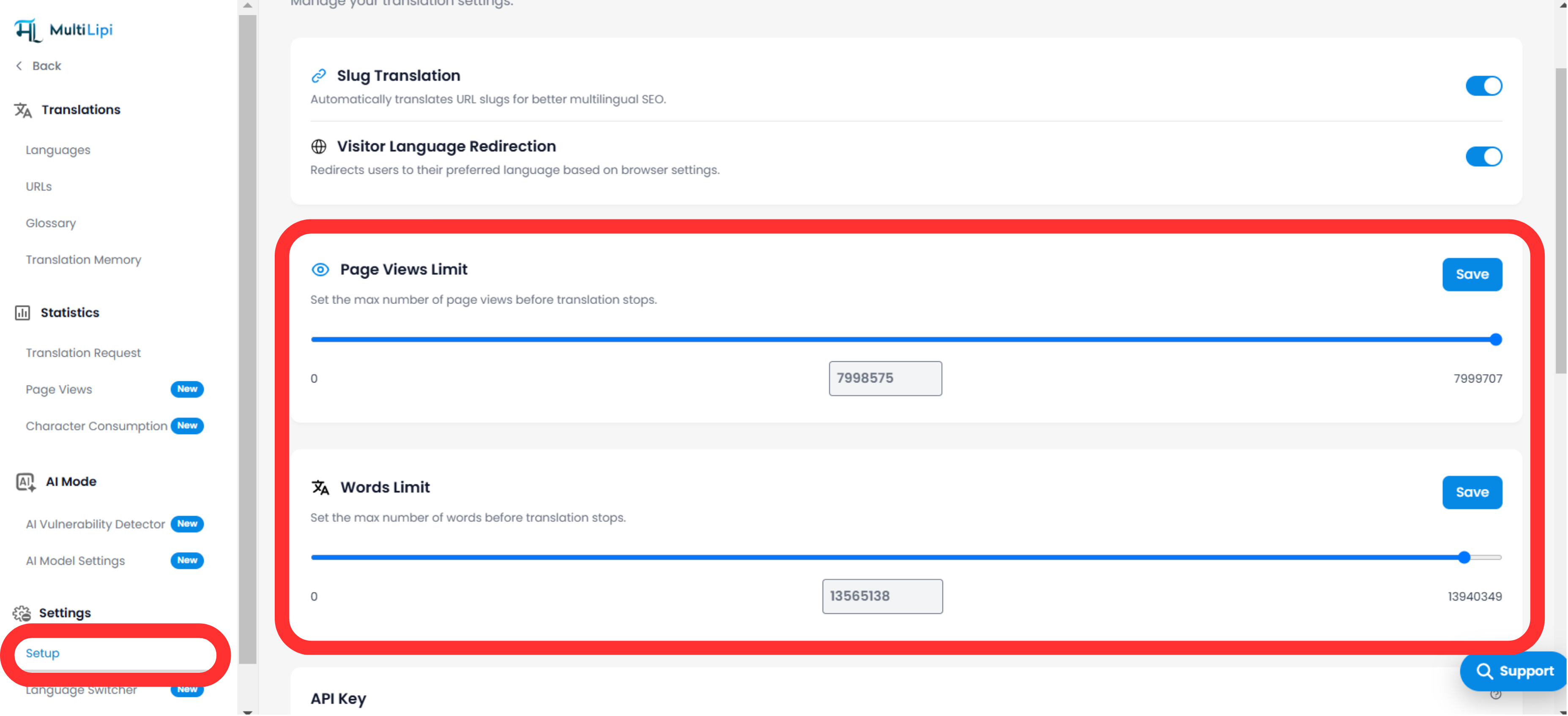
Trinkgeld: Sie können auf Zurücksetzen anytime to clear your limits and start fresh.
Hinweise & Best Practices
-
Monitoring: You’ll see usage stats in your dashboard to track progress against your set limits.
-
Benachrichtigungen: MultiLipi can notify you when you approach or exceed your limits, so you can take action.
-
Flexibility: You can adjust limits up or down at any time.
- Aufprall: Reaching your limit will temporarily suspend new translations or additional translated page views.
Beispiele für Anwendungsfälle
-
Legen Sie ein Page Views Limit to match your plan (e.g., 50,000 per month) so you never exceed included credits.
-
Gebrauchen Words Limit, um zu verhindern, dass große Archive mit Inhalten übersetzt werden, bis Sie die Kosten überprüft haben.
-
Temporarily reduce limits during low-traffic periods.
Kommentare