

Enterprise-Lokalisierung in das Wix-Ökosystem integrieren.
Wix ist ein leistungsstarker visueller Builder, aber seine nativen Übersetzungswerkzeuge können manuell und restriktiv sein. MultiLipi integriert sich direkt in den Wix Head Layer, damit Sie diese Einschränkungen umgehen können. Durch das Einfügen unseres Infrastruktur-Skripts aktivieren Sie sofort die KI-Übersetzung und die automatisierte SEO-Indizierung für Ihre gesamte Website, ohne Ihr bestehendes Design oder Ihren Velo-Code zu ändern.
Diese Anleitung beschreibt den Integrationsprozess mit Wix's Benutzerdefinierter Code Funktion.
1. Voraussetzungen für die Bereitstellung
Wix beschränkt die Code-Einspeisung auf Premium-Konten. Stellen Sie sicher, dass Sie diese Anforderungen erfüllen:
Wix-Tarif
Sie müssen sich auf einer Premium Plan (Light, Core, Business, etc.), die verbundene Domains unterstützt.
Domain-Status
Ihre Website muss eine benutzerdefinierte Domain verbunden haben (z. B. yoursite.com). Das Skript wird nicht auf kostenlosen ausgeführt .wixsite.com Subdomains.
MultiLipi API-Schlüssel
Finden Sie dies in Ihrem Dashboard unter Einstellungen > Allgemein.
2. Schritt 1: Greifen Sie auf die Code-Injection-Ebene zu
- 1
Melden Sie sich bei Ihrem Wix Dashboard.
- 2
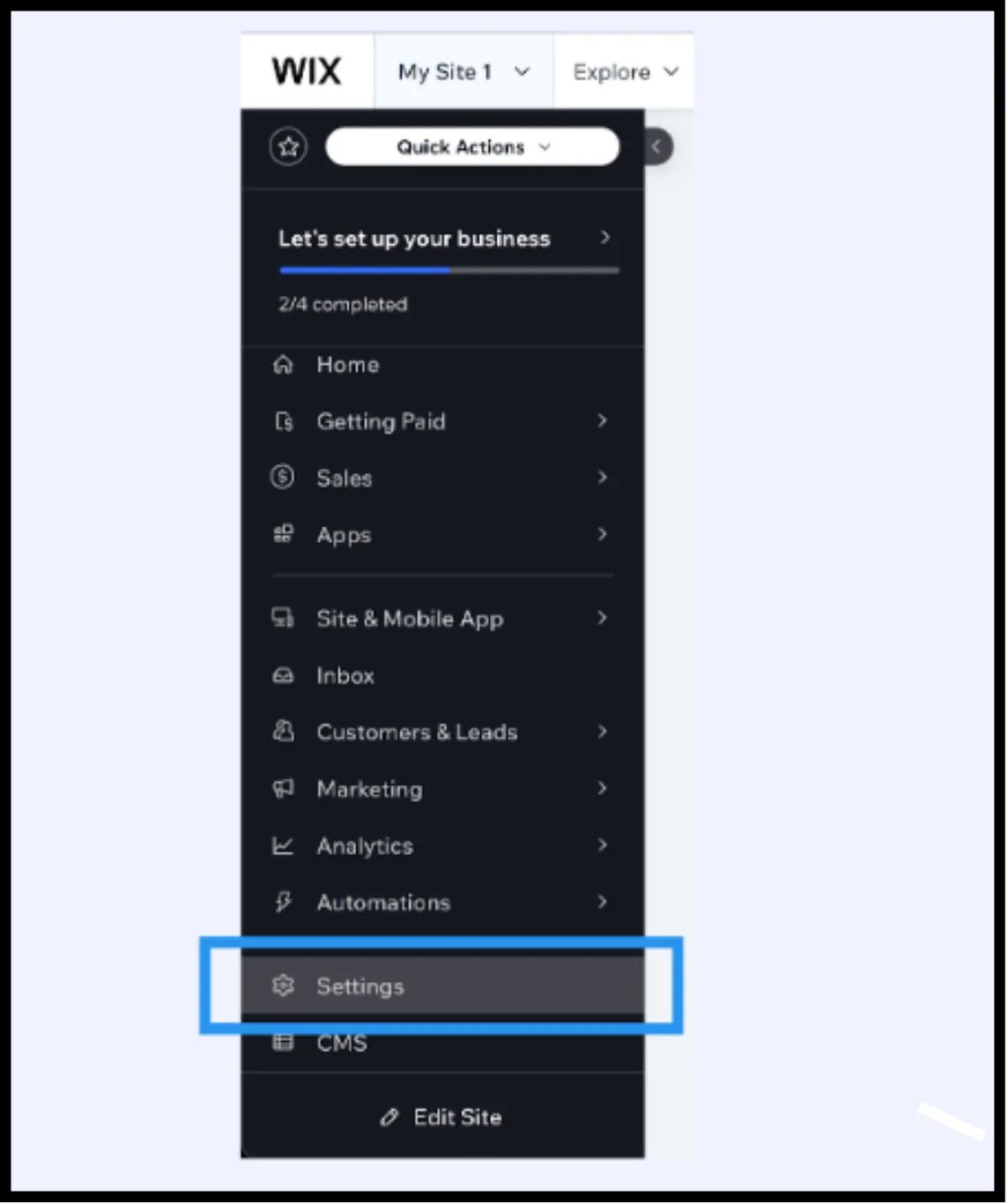
Navigieren Sie zu Einstellungen in der linken Seitenleiste.
- 3
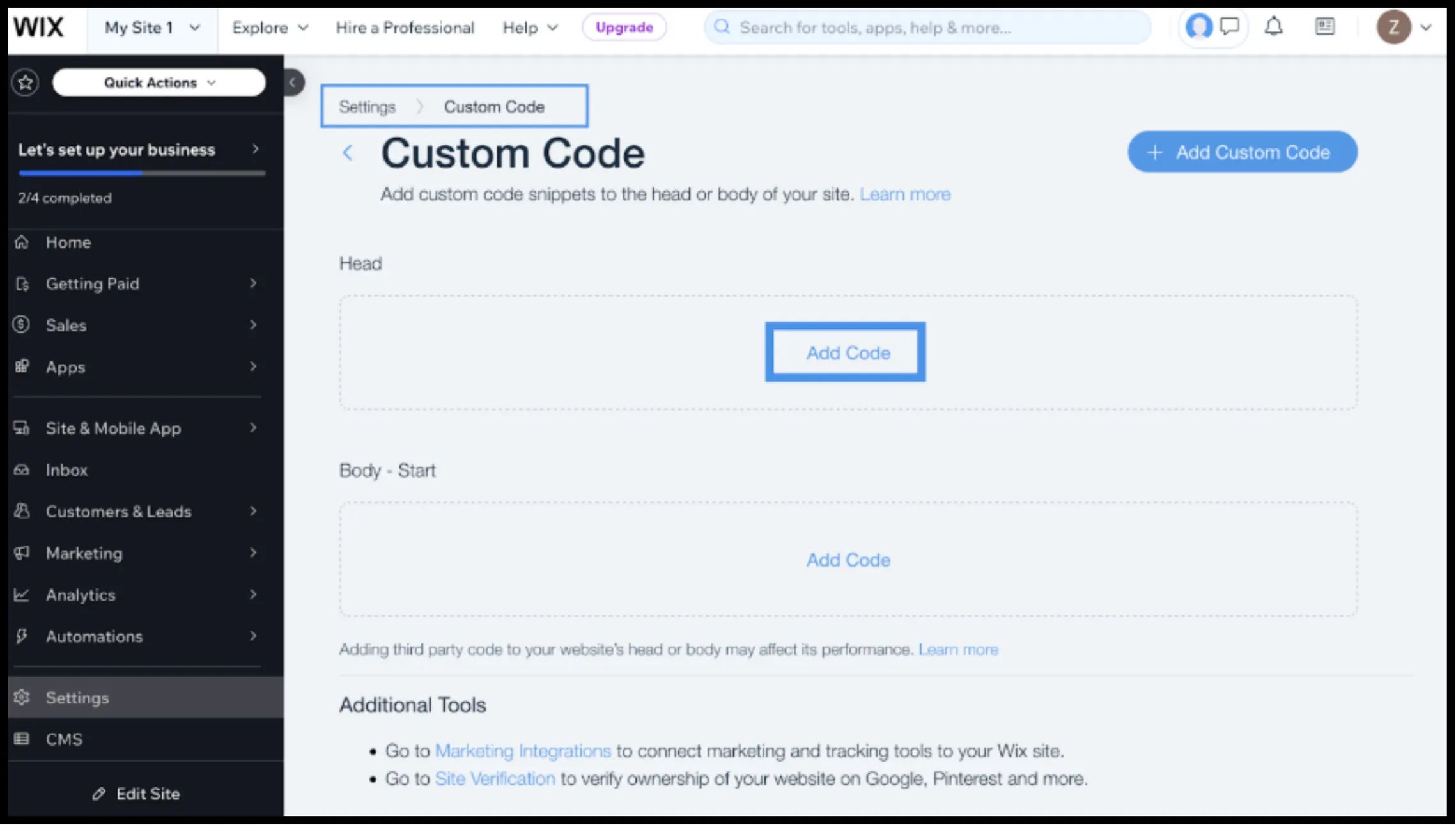
Scroll down to the Fortgeschritten Bereich und wählen Sie Benutzerdefinierter Code.
3. Schritt 2: Skript-Infrastruktur einfügen
- 1
Klicken Sie auf + Benutzerdefinierten Code hinzufügen Schaltfläche in der oberen rechten Ecke.
- 2
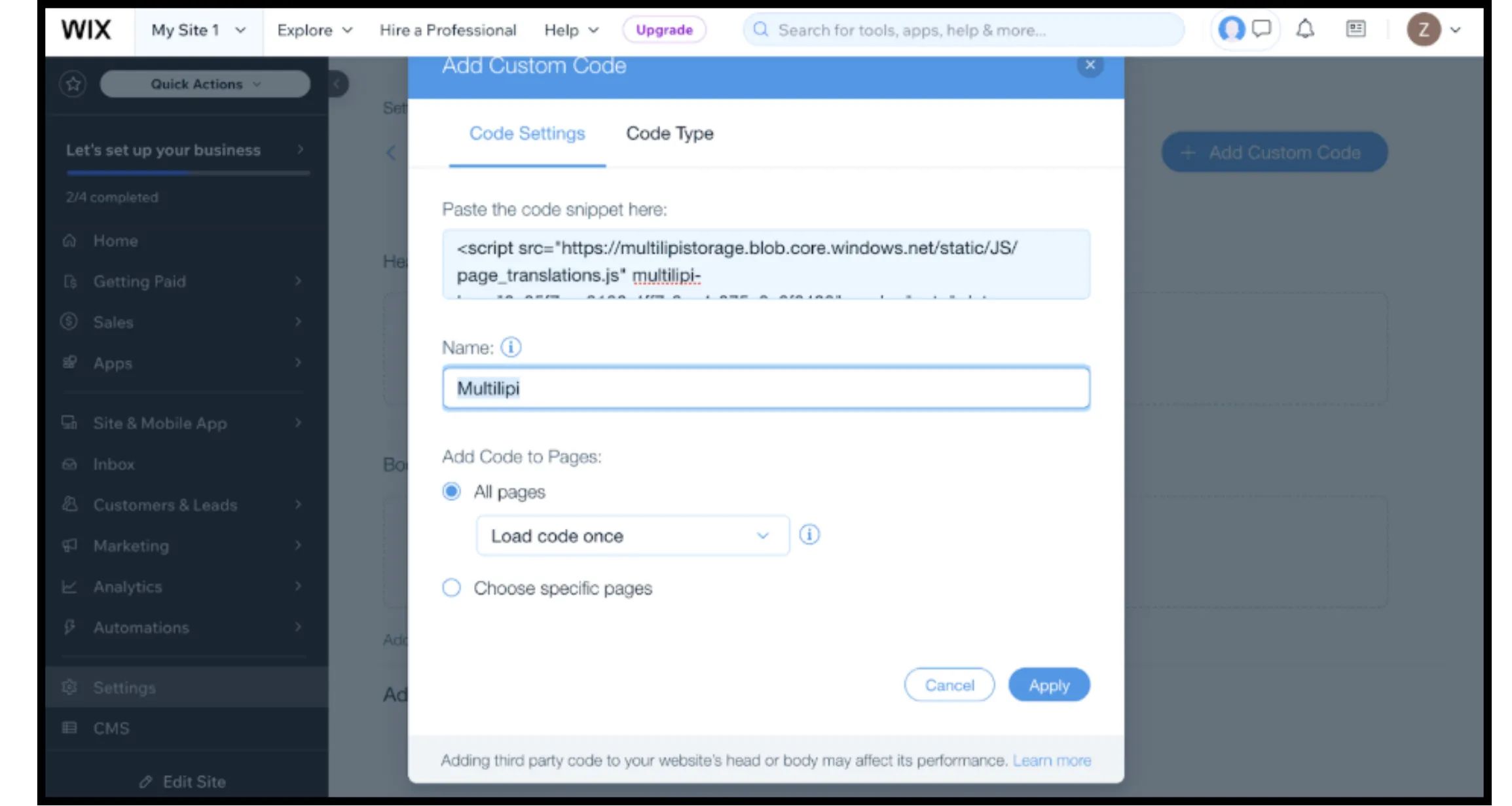
Code-Snippet einfügen: Fügen Sie das folgende Verbindungsskript in das Textfeld ein:
HTML
⚠️ Kritische Konfiguration
- •Snippet einfügen: Stellen Sie sicher, dass Sie
IHR_API_SCHLÜSSEL_HIERdurch Ihren tatsächlichen Schlüssel ersetzen. - •Name: Beschriften Sie es mit „MultiLipi-Infrastruktur“.
- •Code zu Seiten hinzufügen: Auswählen "Alle Seiten" und "Code einmal laden". Dies ist entscheidend für die Leistung von Single Page Applications (SPA).
- •Code platzieren in: Auswählen "Head".
- •Klicken Anwenden.
4. Schritt 3: Bereitstellung & Verifizierung
Wix-Websites werden stark gecacht. Befolgen Sie dieses Protokoll, um die Installation zu überprüfen:
Veröffentlichen
Sie müssen auf Veröffentlichen im Wix Editor, damit der benutzerdefinierte Code live geschaltet wird.
Überprüfen
Öffnen Sie Ihre Live-Domain (vorzugsweise in einem Inkognito-Fenster, um den lokalen Cache zu umgehen).
Visuelle Prüfung
Der Sprachumschalter sollte unten links erscheinen.
Verhaltensprüfung
Wechseln Sie die Sprachen und navigieren Sie zu einer neuen Seite. Die Sprachpräferenz sollte bestehen bleiben.
5. Optimierung & Designintegrität
Sobald die Integration live ist, arbeitet MultiLipi daran, Ihr Wix-Design zu erhalten:
Velo-Kompatibilität
Unsere Engine arbeitet Hand in Hand mit Wix Velo (JavaScript), um sicherzustellen, dass dynamische Inhalte übersetzt werden, ohne die Funktionalität zu beeinträchtigen.
Designschutz
Wenn eine deutsche Übersetzung für einen bestimmten Button zu lang ist, verwenden Sie die Visueller Editor , um den Text manuell zu kürzen und Layoutverschiebungen zu vermeiden.
SEO-Automatisierung
Im Gegensatz zu Standard-Wix-Übersetzungen behandelt MultiLipi automatisch die hreflang Signale, die Google benötigt, um Ihre lokalisierten Seiten korrekt zu indexieren.