

Für WordPress-Umgebungen ist die Kontrolle über URL-Strukturen für lokales SEO von entscheidender Bedeutung. Das MultiLipi WordPress-Plugin enthält einen dedizierten URL-Slug-Manager mit dem Sie explizite Zuordnungsregeln zwischen Ihren Quellpfaden (z. B. /about-us/) und ihren lokalisierten Zielen (z. B. /अनुवादित-पृष्ठ/) definieren können. Dies stellt sicher, dass Ihre spezifischen Schlüsselwörter in der URL-Struktur erhalten bleiben, bevor die Anfrage Ihren Server überhaupt verlässt.
Diese Anleitung beschreibt das Protokoll zur Definition dieser Routing-Maps.
1. Die Mapping-Architektur
Wie das Plugin das Routing handhabt.
Das Plugin fungiert als InterceptorWenn eine Anfrage Ihre WordPress-Site für einen in diesem Manager definierten übersetzten Pfad erreicht, identifiziert das Plugin die Zuordnung und liefert den korrekten zugrunde liegenden Inhalt aus, ohne einen 404-Fehler zu generieren. Dies ermöglicht es Ihnen, englische URLs nahtlos mit nativen Sprach-Slugs zu "maskieren".
2. Konfigurationsprotokoll
Verwalten Sie diese Regeln direkt über Ihr WordPress Admin Panel.
Schritt 1: WP Admin-Kontext aufrufen
Melden Sie sich bei Ihrem WordPress-Dashboard an (/wp-admin).
Stellen Sie sicher, dass das MultiLipi-Plugin installiert und aktiv ist.
Schritt 2: Slug-Manager initialisieren
Suchen und klicken Sie in der Hauptseitenleiste von WordPress auf MultiLipi.
Wählen Sie im Untermenü URL-Slugs.
Kontext: Dies öffnet den MultiLipi URL Slug Manager-Bildschirm, der alle aktiven lokalen Zuordnungen anzeigt.
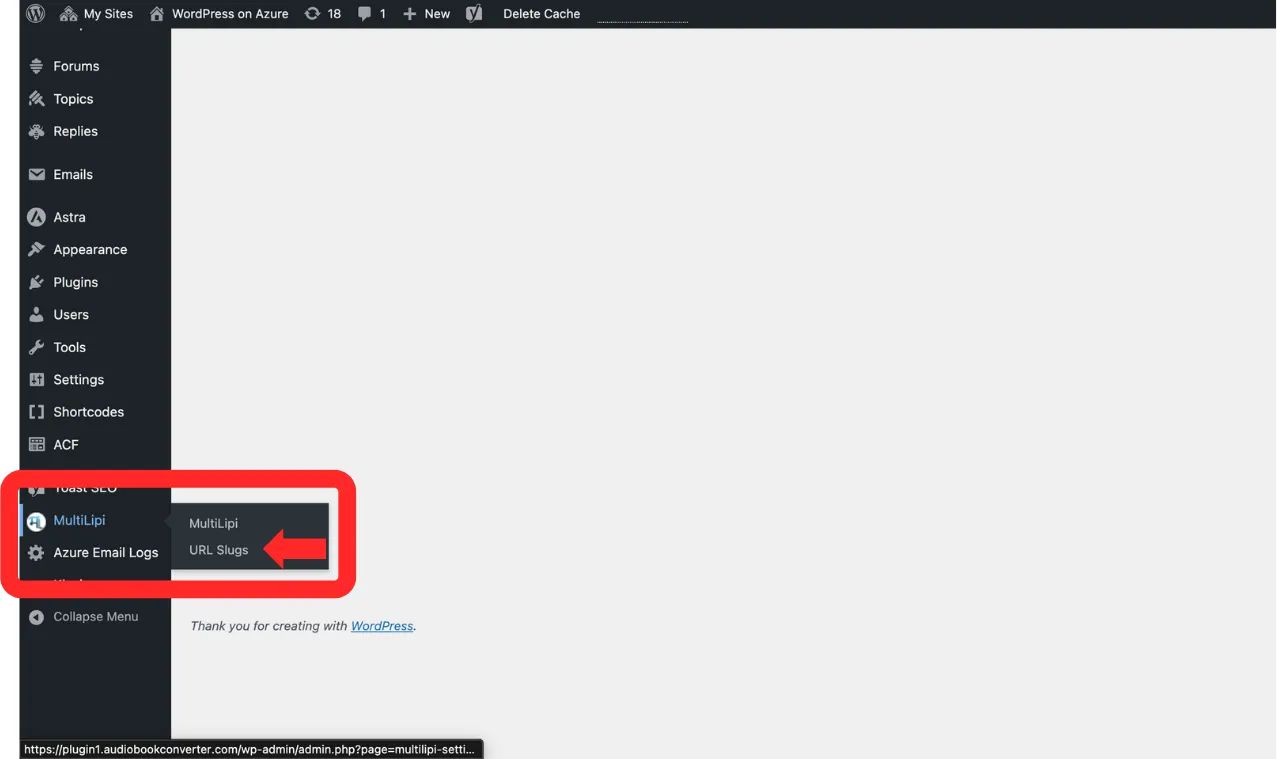
Navigieren Sie zu MultiLipi → URL Slugs aus der WordPress-Seitenleiste
Schritt 3: Neue Regel definieren
Klicken Sie auf die "+ Neue Slugs hinzufügen" Schaltfläche.
Eine neue Eingabezeile wird angezeigt. Füllen Sie das Schema wie folgt aus:
Sprache: Wählen Sie den Ziel-Locale-Code aus (z. B. hi — Hindi).
Ursprünglicher Pfad: Geben Sie die vorhandene Quell-URL ein (z. B. /sample-page/). Hinweis: Diese Seite muss bereits existieren.
Übersetzter Pfad: Geben Sie Ihren gewünschten benutzerdefinierten Slug ein (z. B. /अनुवादित-पृष्ठ/).
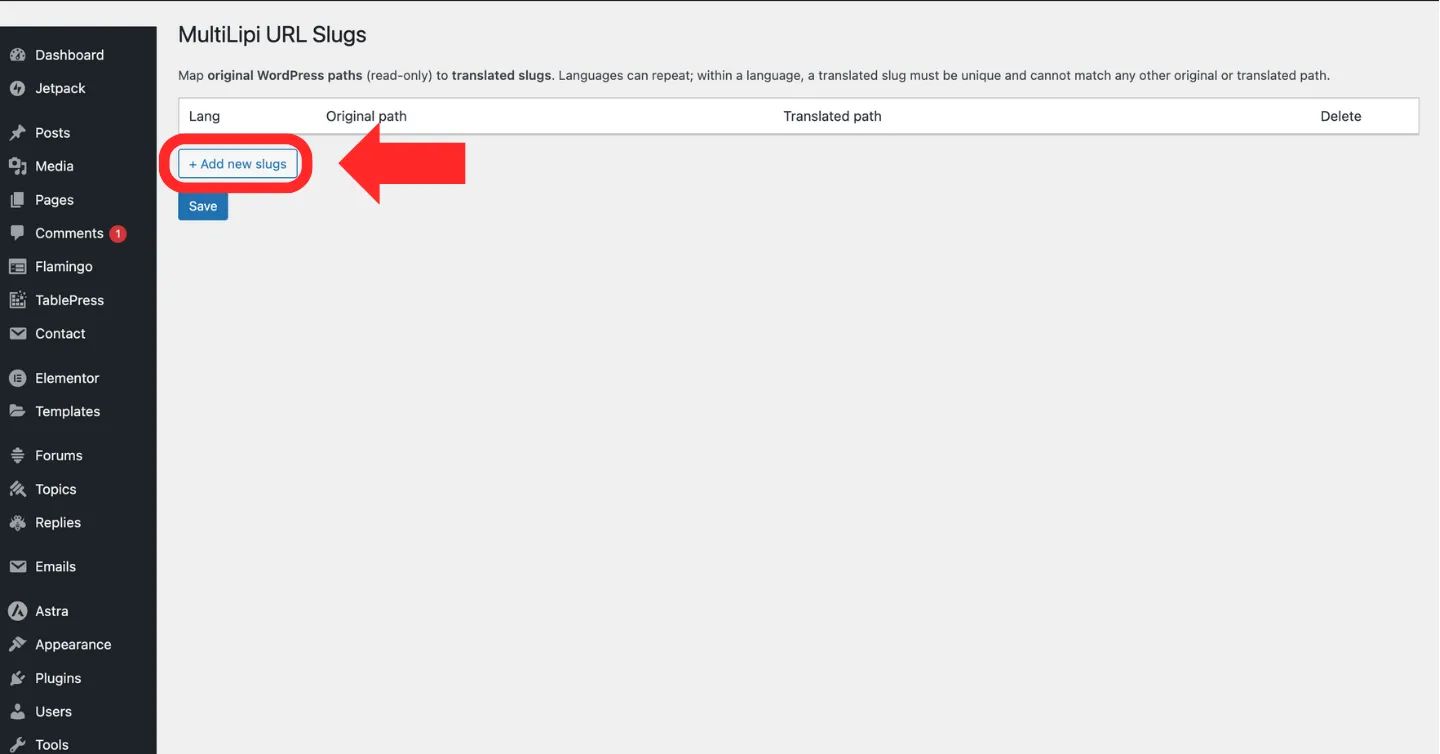
Klicken Sie auf die "+ Neue Slugs hinzufügen" Schaltfläche zum Erstellen einer neuen URL-Mapping-Regel
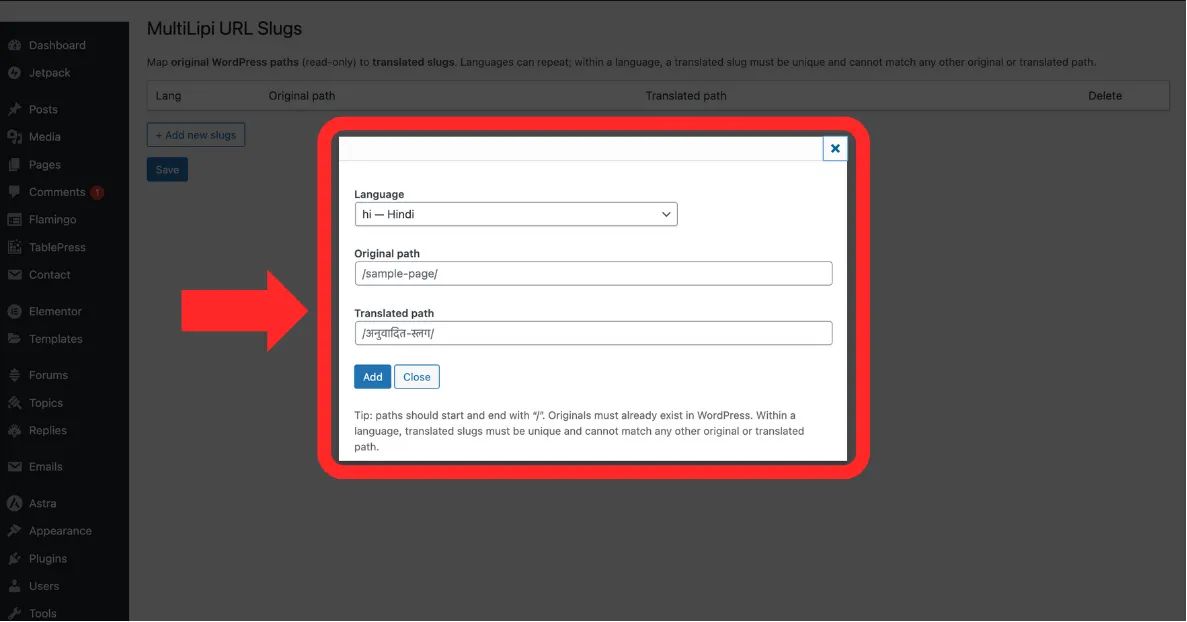
Füllen Sie die Sprache, Originalpfad, und Übersetzter Pfad Felder aus
Schritt 4: Mapping committen
Klicken Sie auf Speichern um die Regel anzuwenden.
Systemaktion: Die Routing-Map wird sofort aktualisiert. Benutzer, die auf Hindi surfen und den übersetzten Pfad besuchen, sehen nun den korrekten Inhalt.
3. Validierung & Einschränkungen
Technische Regeln für gültige Pfade.
Um Routing-Fehler oder Endlosschleifen zu verhindern, erzwingt das System die folgenden strengen Einschränkungen:
Slash-Konsistenz
Jeder Pfad (Original und Übersetzt) muss mit einem Schrägstrich beginnen und enden /.
Korrekt: /about-us/
Falsch: ueber-uns
Einzigartigkeit
Die Übersetzter Pfad muss innerhalb dieser spezifischen Sprache eindeutig sein. Sie können nicht zwei verschiedene Seiten auf denselben Slug abbilden.
Existenzprüfung
Sie können keine "Geister-URL" zuordnen. Die Originalpfad muss sich auf eine gültige, veröffentlichte Seite auf Ihrer WordPress-Site beziehen.