
Wahre Lokalisierung geht über den Seitenkörper hinaus; sie umfasst die eigene URL-StrukturDer "Slug-Übersetzer" wandelt den semantischen Pfad Ihrer Links um (z. B. /ueber-uns) in die Zielsprache (z. B., /a-propos or /sobre-nosotros). Dies ist entscheidend für Mehrsprachige SEO, da Suchmaschinen URLs priorisieren, die der Suchintention des Nutzers in seiner Muttersprache entsprechen.
Diese Anleitung beschreibt die Konfigurationsprotokoll, Kollisionsmanagement und Routing-Logik für die tiefe URL-Lokalisierung.
1. Aktivierungsprotokoll
Aktivieren Sie die Tiefenlokalisierung.
Standardmäßig versucht MultiLipi, Slugs zu übersetzen, um das SEO zu maximieren. Sie sollten jedoch Überprüfen Sie diese Konfiguration in Ihren Projekteinstellungen.
Schritt 1: Greifen Sie auf die Projekteinstellungen zu
- •Melden Sie sich bei Ihrem an MultiLipi Dashboard.
- •Navigieren Sie zu Einstellungen in der linken Seitenleiste.
- •Wählen Sie Projekteinstellungen aus dem Untermenü.
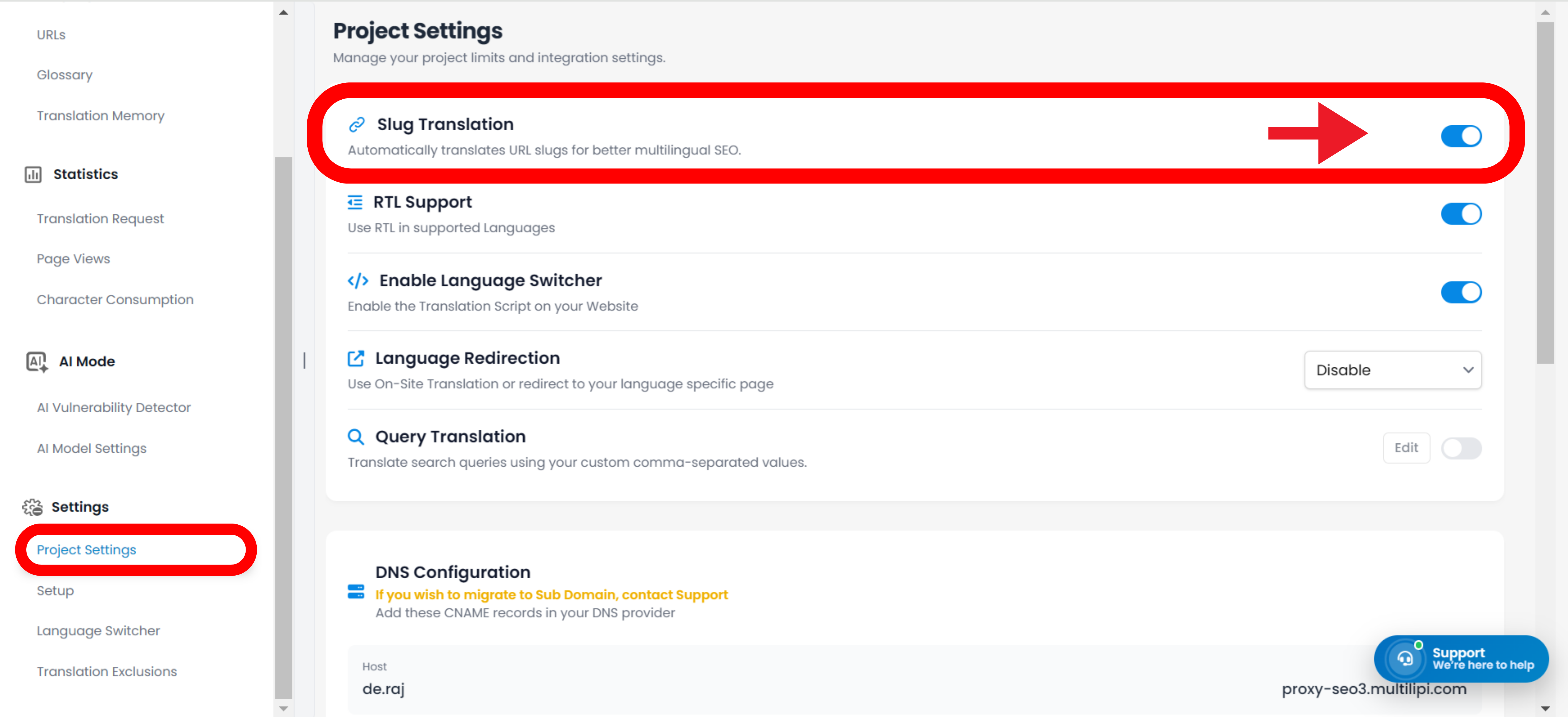
Schritt 2: Aktivieren Sie das Modul
- •Scrollen Sie nach unten zum Slug-Übersetzung Abschnitt.
- •Aktion: Stellen Sie sicher, dass der Schalter auf
AN(Blaue Position).
Die Engine generiert automatisch lokalisierte URLs für alle neuen und bestehenden Seiten (z. B. /kontakt → /contacto).
URLs bleiben auch auf übersetzten Seiten auf Englisch (z. B. /es/contact).
2. Automatische Topologie-Updates (Link-Umschreibung)
Wie das System die interne Navigation handhabt.
Eine der leistungsstärksten Funktionen der Slug-Übersetzungs-Engine ist Automatisches Umschreiben von Links.
Der Mechanismus:
Wenn ein Slug übersetzt wird (z. B. /shop → /boutique), scannt MultiLipi Ihre lokalisierten Seiten nach internen Links, die auf die alte URL verweisen.
Die Aktion:
Es schreibt automatisch die <a href="..."> Tags im HTML um, um auf den neuen, lokalisierten Slug zu verweisen.
Das Ergebnis:
Benutzer bleiben im lokalisierten Ökosystem. Ein französischer Benutzer, der auf „Shop“ klickt, wird zu /boutique weitergeleitet, nicht zurück zu /shop.
3. Verwaltung: Manuelle Überschreibung
Präzise Steuerung für URL-Schlüsselwörter.
Während unsere KI automatisch SEO-freundliche Slugs generiert, möchten Sie vielleicht eine URL manuell verfeinern um gezielt lokale Schlüsselwörter anzusprechen oder eine Marketingkampagne abzugleichen.
- •Navigieren Sie zu Übersetzungen Bereich Ihres Dashboards.
- •Suchen Sie die spezifische Seitenzeile, die Sie ändern möchten.
- •Klicken Sie auf Slug bearbeiten neben der URL-Vorschau.
- •Eingabe: Geben Sie Ihren bevorzugten String ein (z. B. ändern Sie
/produkteto/boutique). - •Commit: Klicken Sie auf
Änderungen speichern.
Hinweis: Das System aktualisiert sofort die interne Routing-Map, um Inhalte unter dieser neuen Adresse bereitzustellen.
4. Protokoll zur Kollisionsverwaltung
Verhindern von Routing-Konflikten.
In einigen Sprachen können zwei verschiedene englische Wörter in dasselbe Fremdwort übersetzt werden, was zu einem Slug-Kollision.
Szenario:
Sie haben /laden (Einzelhandel) und /shop (Verb). Beide könnten automatisch übersetzt werden zu /boutique auf Französisch.
Das Risiko:
Doppelte URLs verwirren Suchmaschinen und verursachen Routing-Fehler.
Die Lösung:
Benutzen Sie die Manuelle Überschreibung (Schritt 3), um sie zu unterscheiden (z. B. beibehalten /boutique für den Shop und verwenden /kaufen für das Verb).
5. Legacy-Weiterleitungsstrategie (301er)
Umgang mit Änderungen an Live-URLs.
Wenn Sie sich entscheiden, einen übersetzten Slug zu ändern, nachdem Google ihn bereits indiziert hat (z. B. Änderung von /fr/a-propos to /fr/notre-histoire), müssen Sie sicherstellen, dass Benutzer keinen 404-Fehler erhalten.
Best Practice:
Richten Sie ein 301-Weiterleitung in Ihrem zugrunde liegenden CMS (WordPress/Shopify/Webflow).
Arbeitsablauf:
Leiten Sie das alte übersetzte URL-Muster auf das neue übersetzte URL-Muster um, um Ihr SEO zu erhalten "Link Juice."
6. Universelle CMS-Integration
Plattformunabhängiges Routing.
Da MultiLipi als Proxy-Schicht, die Slug-Übersetzung funktioniert unabhängig von Ihrem Backend.
Unterstützte Plattformen:
WordPress, Shopify, Webflow, Wix, Squarespace und Benutzerdefiniertes HTML.
Keine Backend-Konfiguration:
Sie müssen diese Seiten nicht in Ihrem CMS erstellen. MultiLipi virtuell zuordnet die Anfrage /fr/boutique zu Ihrem Original /shop Seite, während der übersetzte Inhalt angezeigt wird.