
1. Das Prüfprotokoll
Schritt 1: Projektkontext aufrufen
Melden Sie sich in Ihrem MultiLipi-Dashboard an.
Klicken Sie in der linken Seitenleiste unter dem Menüpunkt Übersetzungen auf Ihr aktuelles Projekt, um dessen spezifische Einstellungen zu öffnen.
Schritt 2: Aufrufen der Routing-Karte
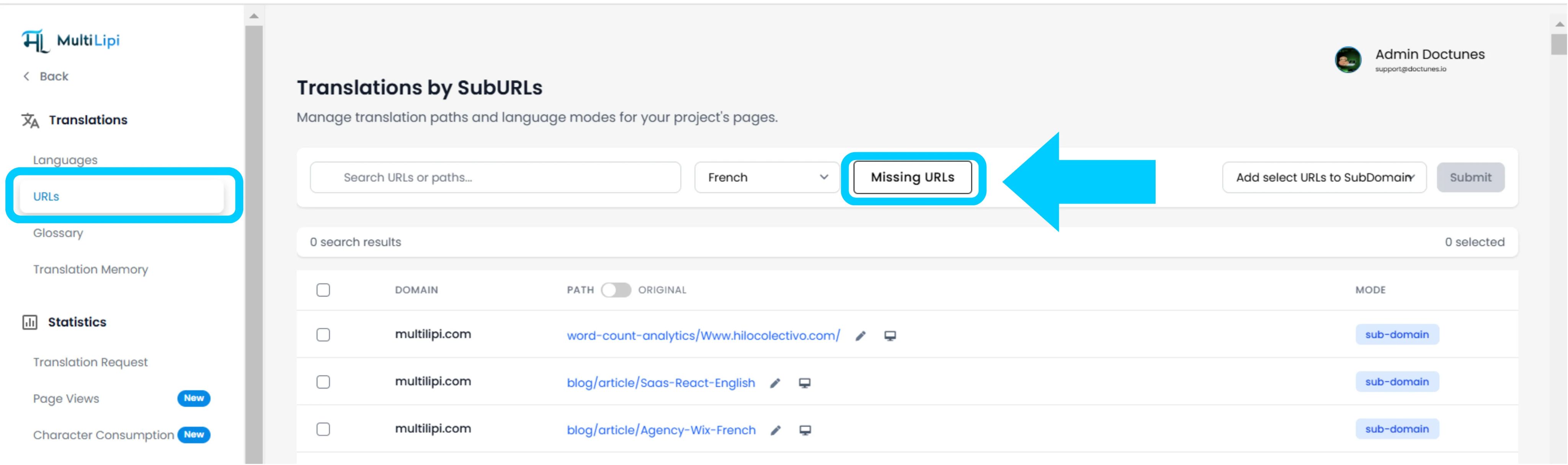
Klicken Sie in der Projektansicht auf URLs Option in der Seitenleiste.
Kontext: Dieses Panel zeigt das Verzeichnis aller derzeit verfolgten und übersetzten Pfade an.
Schritt 3: Zielkontext definieren
Suchen Sie das Dropdown-Menü neben der Suchleiste.
Aktion: Wählen Sie die spezifische Sprache aus, die Sie überprüfen möchten (z. B. Französisch).
Logik: Das System vergleicht nun den Quellindex (Englisch) mit dem französischen Index.
Schritt 4: Scan ausführen
Klicken Sie auf die Fehlende URLs Schaltfläche.
Systemaktion: Die Engine scannt Ihre Quelldomain nach gültigen Pfaden, die in der aktuellen Sprachkarte fehlen.
2. Einlesen und Synchronisierung
Prüfungszusammenfassung
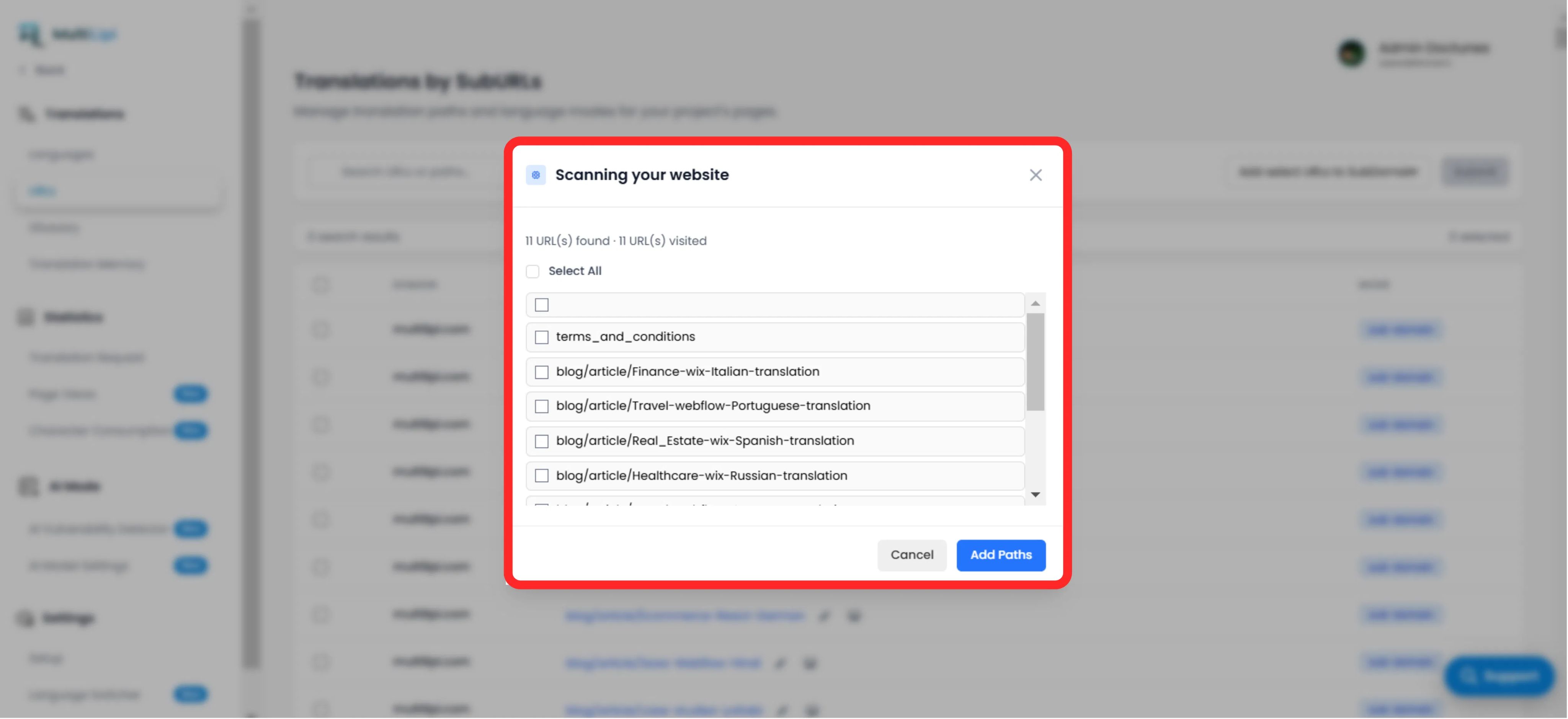
Zeigt die Gesamtzahl der gefundenen unübersetzten Pfade an.
Pfadliste
Eine granulare Liste aller spezifischen URLs (z. B. /blog/new-feature), die in der Zielsprache fehlt.
Das Korrekturprotokoll
Auswahl: Manuell die Kontrollkästchen für bestimmte Seiten aktivieren oder auf "Alle auswählen" klicken, um den gesamten Stapel zu synchronisieren.
Commit: Klicken Sie auf die Schaltfläche "Pfade hinzufügen".
Ergebnis: Diese URLs werden sofort zur Übersetzungswarteschlange hinzugefügt. Das System generiert nun die lokalisierten Versionen und leitet den Datenverkehr darauf weiter.
3. Strategische Vorteile
SEO-Abdeckung
Suchmaschinen können keine Seiten indexieren, die nicht existieren. Das Hinzufügen dieser URLs stellt sicher, dass Google Ihre gesamte Website auf Französisch indexiert und nicht nur die Startseite.
Verhinderung von Sackgassen
Stellt sicher, dass ein Benutzer, der die Sprache auf einer tiefen Seite wechselt, nicht auf die Homepage zurückgeworfen wird, weil die spezifische Übersetzung fehlte.
Automatisierte Erkennung
Macht manuelle Tabellen zur Verfolgung übersetzter Blogbeiträge überflüssig.
Profi-Tipp
Navigieren Sie nach dem Einlesen neuer Pfade zu KI-Modus > Schwachstellenerkennung um einen sofortigen SEO-Gesundheitscheck für diese neu erstellten Seiten durchzuführen, um sicherzustellen, dass sie für den Start optimiert sind.