
Warum Markdown für KI wichtig ist
In der Generative Engine Optimization (GEO) Workflow, HTML ist "Rauschen". KI-Modelle (wie ChatGPT oder Custom GPTs) bevorzugen Markdown—ein leichtgewichtiges, strukturiertes Textformat, das Designelemente entfernt, um sich ausschließlich auf den Inhalt zu konzentrieren.
MultiLipi konvertiert automatisch jede übersetzte Seite Ihrer Website in eine saubere Markdown-Datei. Die Markdown Content Manager ermöglicht es Ihnen, diese Dateien zu überprüfen, um sicherzustellen, dass KI-Agenten Ihre Inhalte genau so lesen, wie Sie es beabsichtigen.
Keine HTML-Tags, nur reine Inhaltsstruktur
Perfekt für Vektordatenbanken und KI-Training
Bei Bedarf neu generieren für frische Inhalte
Zugriff auf den Content Manager
Um auf Ihr KI-fähiges Dateiverzeichnis zuzugreifen:
- 1Melden Sie sich bei Ihrem an MultiLipi Dashboard.
- 2Wählen Sie Ihre aktive Projekt.
- 3Klicken Sie in der linken Seitenleiste unter dem LLM-OPTIMIERUNG Abschnitt, klicken Sie auf Markdown-Dateien.
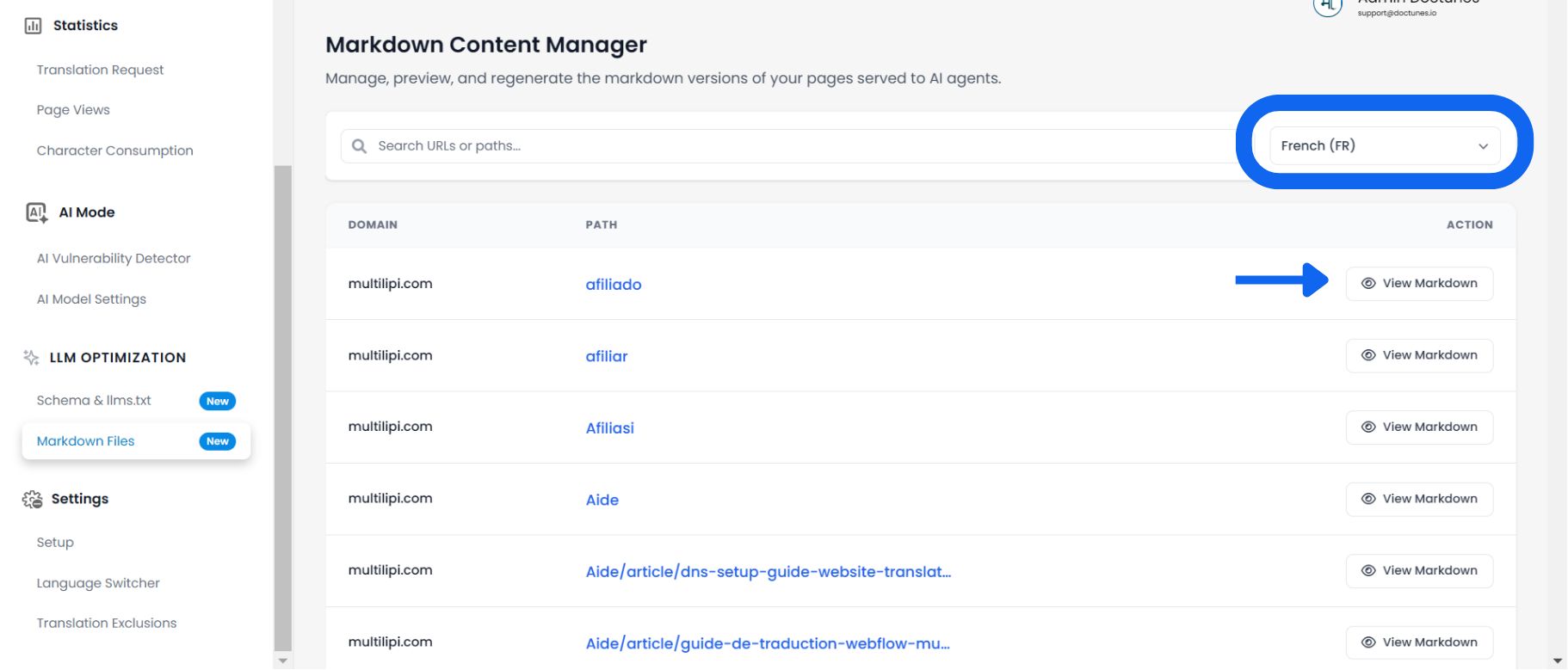
Filtern nach Zielsprache
Ihre Website existiert in mehreren Sprachen, und das gilt auch für Ihre Markdown-Dateien. Sie müssen überprüfen, ob die lokalisiert Version korrekt ist.
Oben rechts im Dashboard sehen Sie einen Sprachselektor (standardmäßig Ihre primäre Sprache).
Klicken Sie auf das Dropdown, um die Ansichten zu wechseln (z. B. wählen Sie Französisch (FR) um die für Ihre französische Website generierten Markdown-Dateien anzuzeigen).
Überprüfung & Neuerstellung von Inhalten
Sobald Sie eine Sprache ausgewählt haben, sehen Sie eine Liste aller verfügbaren URLs (Pfade).
Klicken Sie auf die Markdown anzeigen Schaltfläche neben jeder URL.
Schnappen Sie sich sofort den sauberen Text, um ihn in ChatGPT oder eine Vektordatenbank einzufügen.
Wenn die Datei veraltet aussieht, klicken Sie auf das blaue Neu generieren Schaltfläche, um einen neuen Crawl zu erzwingen.
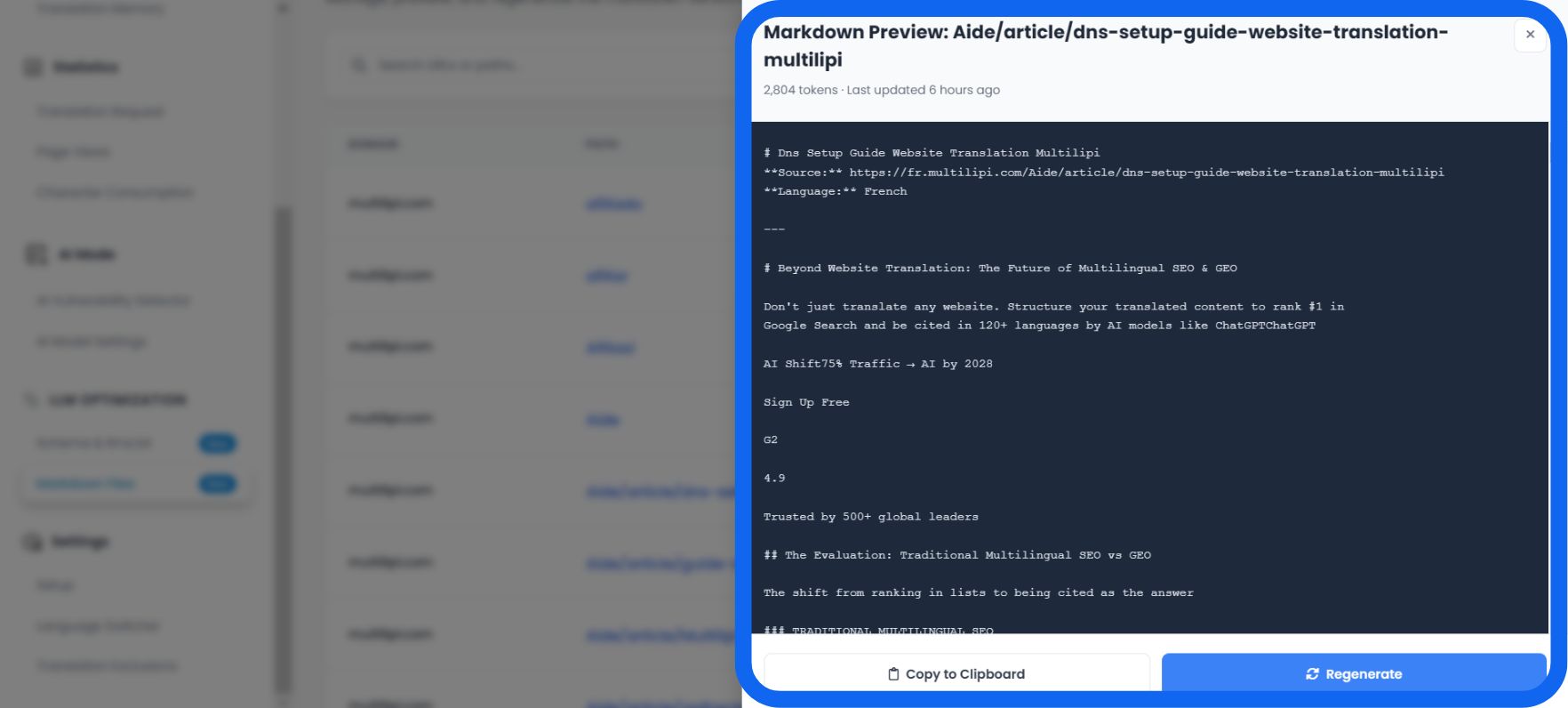
Überprüfung des KI-Kontexts
💡 Liest die KI die richtige Quelle?
Wenn Sie die Vorschau öffnen, beachten Sie die Metadatenblock ganz oben in der Datei.
**Quelle:**Bestätigt die genaue URL, auf die sich die KI bezieht.
**Sprache:**Teilt der KI explizit mit, welches Sprachmodell verwendet werden soll (z. B. „Französisch“).
Synchronisierungsstrategie
🔄 Halten Sie Ihren "AI Twin" auf dem neuesten Stand.
Ihre Markdown-Datei ist ein Schnappschuss Ihrer Website. Wenn Sie Ihre Preisseite heute aktualisieren, wird die Markdown-Datei nicht sofort aktualisiert.
⚠️ Das Risiko
Eine KI könnte eine Benutzerfrage mit Ihren alt Preisgestaltung, da die zwischengespeicherte Markdown-Datei gelesen wird.
✅ Die Lösung
Immer wenn Sie eine größere Inhaltsaktualisierung auf Ihrer Live-Website vornehmen, gehen Sie zu diesem Dashboard und klicken Sie auf Neu generieren auf der entsprechenden Seite. Dies stellt sicher, dass jeder KI-Bot, der Ihre Website crawlt, sofort die aktuellsten und genauesten Daten erhält.