

Enterprise-Lokalisierung erfordert oft Offline-Workflows. Ob Sie 5.000 Zeichen zur Überprüfung an ein Rechtsteam senden oder eine Legacy-Übersetzungsspeicher aus einem anderen System migrieren müssen, MultiLipi bietet vollen Lese-/Schreibzugriff auf Ihre linguistischen Daten.
Diese Anleitung behandelt die Protokolle für Aufnahme externer Daten (Import) und Extraktion von Übersetzungsspeicher (Export).
Aufnahme von Daten (Das Importprotokoll)
Am besten geeignet für: Massenaktualisierungen, Migration von anderen Plattformen oder Wiederherstellung von Sicherungen.
Sie können Ihren Live-Übersetzungsindex überschreiben oder aktualisieren, indem Sie eine strukturierte Datei hochladen.
Schritt 1: Zugriff auf die linguistische Ebene
- Navigieren Sie zu Ihrem MultiLipi Dashboard.
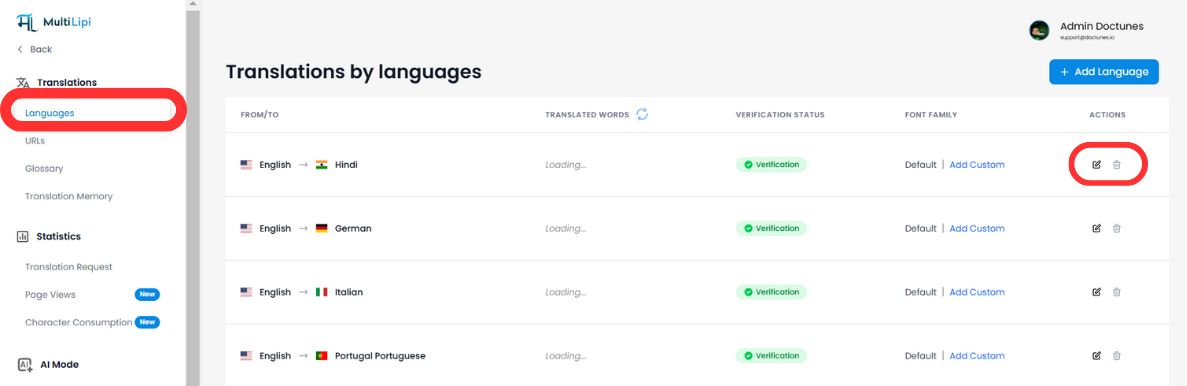
- Wählen Sie Übersetzungen > Sprachen in der Seitenleiste.
- Suchen Sie das spezifische Sprachpaar, das Sie aktualisieren möchten (z. B. Englisch → Hindi).
- Klicken Sie auf die Bearbeiten-Symbol (Stift), um das Translation Memory für diese Locale zu öffnen.
Schritt 2: Ingestion starten
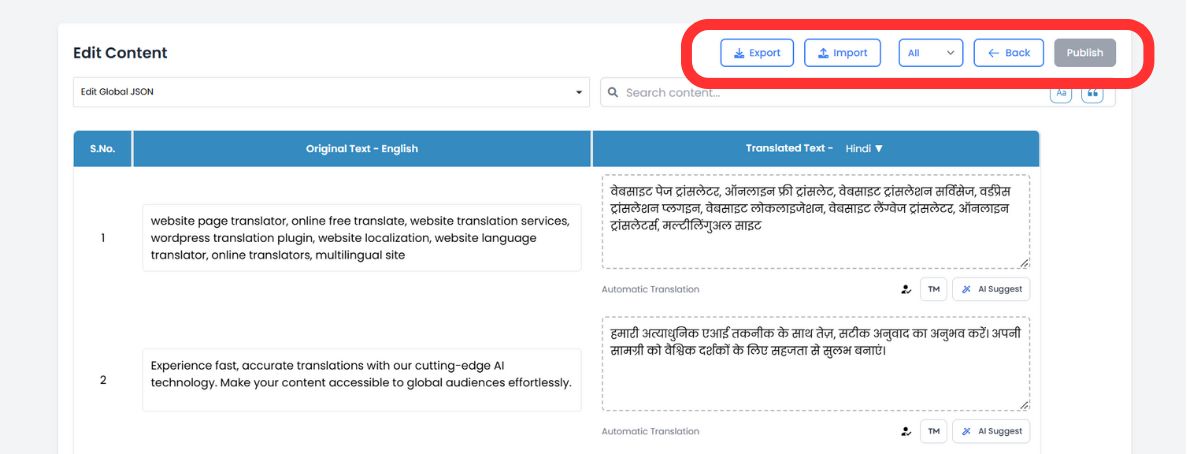
Klicken Sie in der oberen Symbolleiste des Editors auf das Import-Symbol.
Schritt 3: Hochladen & Konfigurieren
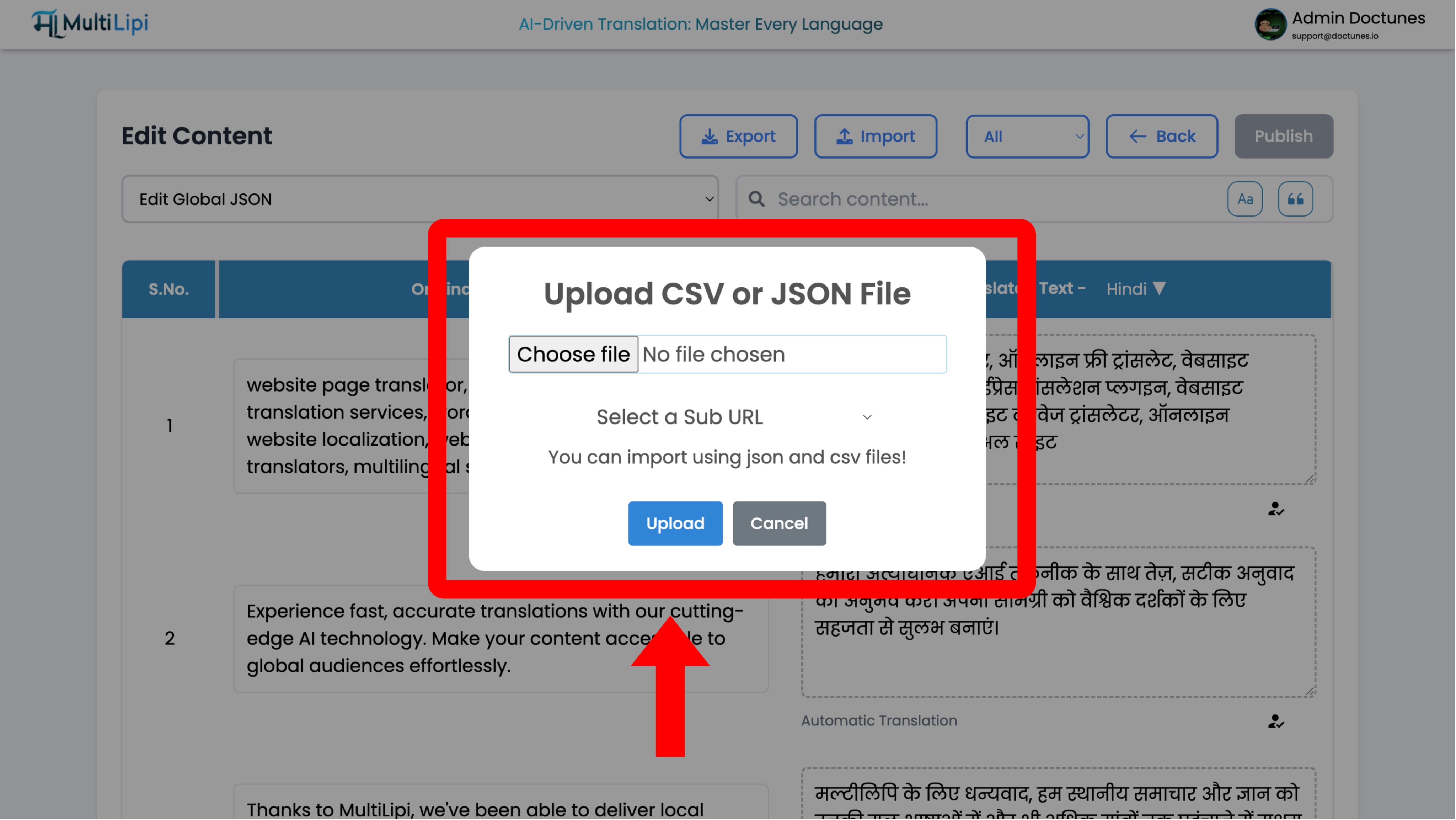
Ein Konfigurationsmodal wird angezeigt:
Dateiauswahl
Laden Sie Ihre .csv or .json Datei hoch.
Geltungsbereichsdefinition
- •Global: Wenden Sie diese Übersetzungen auf die gesamte Domain an.
- •Geltungsbereich: Verwenden Sie das Dropdown-Menü "Unter-URL", um diese Übersetzungen nur auf eine bestimmte Seite anzuwenden (z. B.
/pricing).
Ausführen
Klicken Sie auf Hochladen.
Systemaktion
Das System analysiert die Datei und aktualisiert sofort den Translation Memory. Live-Änderungen werden sofort an das Edge-Netzwerk weitergegeben.
Datenextraktion (Das Exportprotokoll)
Am besten geeignet für: Offline-Prüfungen, professionelle menschliche Überprüfung und Compliance-Backups.
Sie besitzen Ihre Daten. Sie können Ihren gesamten Translation Memory jederzeit herunterladen.
1. Editor aufrufen
Navigieren Sie zum selben Spracheditor wie oben.
2. Extraktion ausführen
Klicken Sie auf die Export-Symbol (neben Import).
3. Formatwahl
Wählen
.csv(für Tabellenkalkulationen/Excel) oder.json(für Entwickler).4. Ergebnis
Das System generiert eine strukturierte Datei, die jede Quellzeichenfolge und ihre aktuelle Übersetzung enthält.
Strategische Anwendungsfälle
| Vorgang | Szenario |
|---|---|
| Offline-Prüfung | Exportieren Sie Ihre Seite "Rechtliche Bestimmungen" als CSV und senden Sie sie zur Überarbeitung in Excel an Ihre Rechtsabteilung. Importieren Sie die genehmigte Datei zurück. |
| Professionelle Überprüfung | Exportieren Sie automatisch übersetzte Inhalte, senden Sie sie an einen zertifizierten menschlichen Übersetzer und nehmen Sie deren Korrekturen in großen Mengen auf. |
| Backup-Strategie | Führen Sie wöchentliche Exporte durch, um ein lokales "Cold Storage"-Backup Ihrer Übersetzungswerkzeuge zu pflegen. |