
KI-Übersetzungsmodelle sind leistungsstark, aber sie können sein zu kreativ. Ein Glossar fungiert als "Guardrail Layer," wodurch die Übersetzungs-Engine gezwungen wird, Ihre spezifischen Markenregeln einzuhalten. Ob es darum geht, sicherzustellen "Apple" bleibt ein Markenname (und keine Frucht) oder die Beibehaltung rechtlicher Haftungsausschlüsse im Wortlaut, die MultiLipi Glossar-Manager gibt Ihnen die absolute Kontrolle.
Diese Anleitung behandelt die beiden Methoden zur Definition dieser Regeln: Manuelle Eingabe (Präzision) und CSV-Import (Massenimport).
Erzwingen Sie eine strenge Terminologiekonsistenz
Glossare überschreiben KI-Übersetzungsentscheidungen, um die Markenintegrität zu wahren. Verwenden Sie sie für Firmennamen, Produkt-SKUs, Rechtsbegriffe, Fachjargon und hochwertige SEO-Schlüsselwörter, die über alle Sprachen hinweg konsistent bleiben müssen.
Zugriff auf die Terminologiedatenbank
Das Glossar ist eine globale Einstellung, die für alle Ihre Projekte gilt.
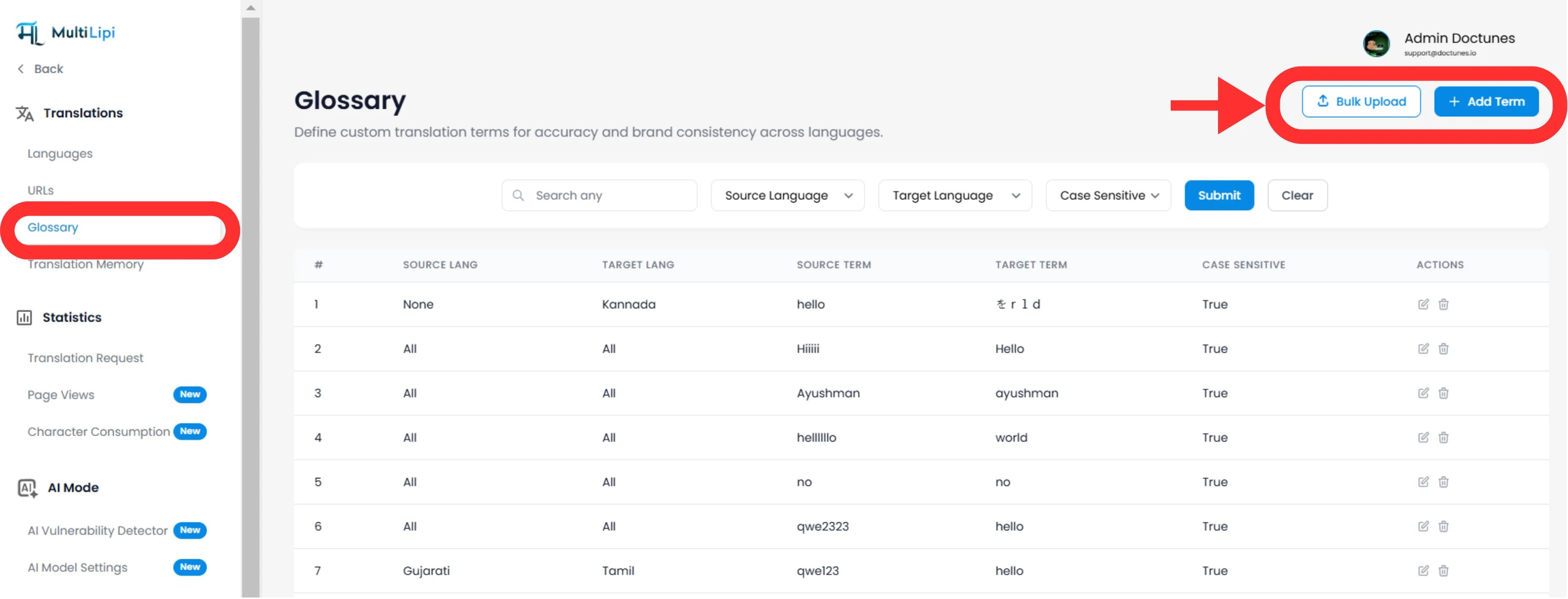
Navigieren: Erweitern Sie in Ihrem MultiLipi Dashboard die Übersetzungen Menü in der Seitenleiste.
Auswählen: Klicken Sie auf Glossar.
Ansicht: Sie sehen eine durchsuchbare Tabelle aller aktiven Regeln, ihrer Sprachpaare und ihrer Groß-/Kleinschreibung.
Methode 1: Präzisionsregeldefinition (manuell)
Am besten geeignet für:
Markennamen, Produkt-SKUs und spezifische Marketing-Slogans sperren.
Initiieren
Klicken Sie auf die Neu Schaltfläche in der oberen rechten Ecke.
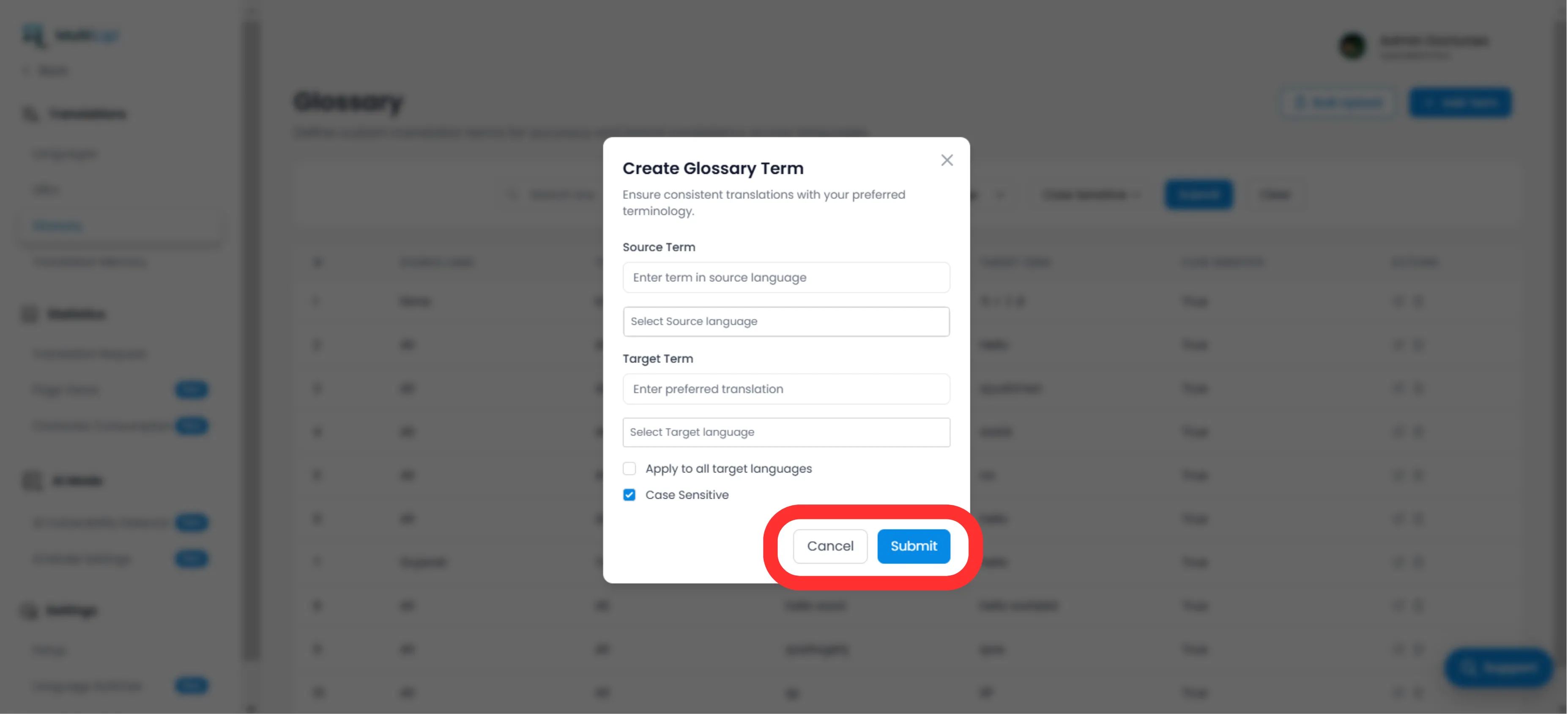
Definieren Sie die Regel
Quellbegriff
Das exakte Wort oder die exakte Phrase in Ihrer Originalsprache (z. B. "CloudDrive").
Zielbegriff
Die vorgeschriebene Übersetzung (z. B. "CloudDrive" - um es auf Englisch zu belassen, oder "Le CloudDrive").
Sprachumfang
Spezifisch
Nur anwenden auf EN → FR.
Global
Wählen Sie "Alle Sprachen" um einen Markennamen weltweit zu sperren.
Groß-/Kleinschreibung
Aktiviert
Übereinstimmungen "Apple" aber ignoriert "apple". Unerlässlich für gebräuchliche Wörter, die auch Eigennamen sind.
Bereitstellen
Klicken Sie auf Senden. Die Regel lautet sofort übertragen an die Übersetzungs-Engine und gilt für alle zukünftigen Übersetzungen.
Methode 2: Massenaufnahme (CSV-Upload)
Am besten geeignet für:
Migration von alten Terminologiedatenbanken, juristischen Wörterbüchern oder E-Commerce-Produktlisten.
Wenn Sie Hunderte von Begriffen, geben Sie sie nicht manuell ein. Verwenden Sie unser CSV-Import-Tool.
Bereiten Sie Ihre Daten vor
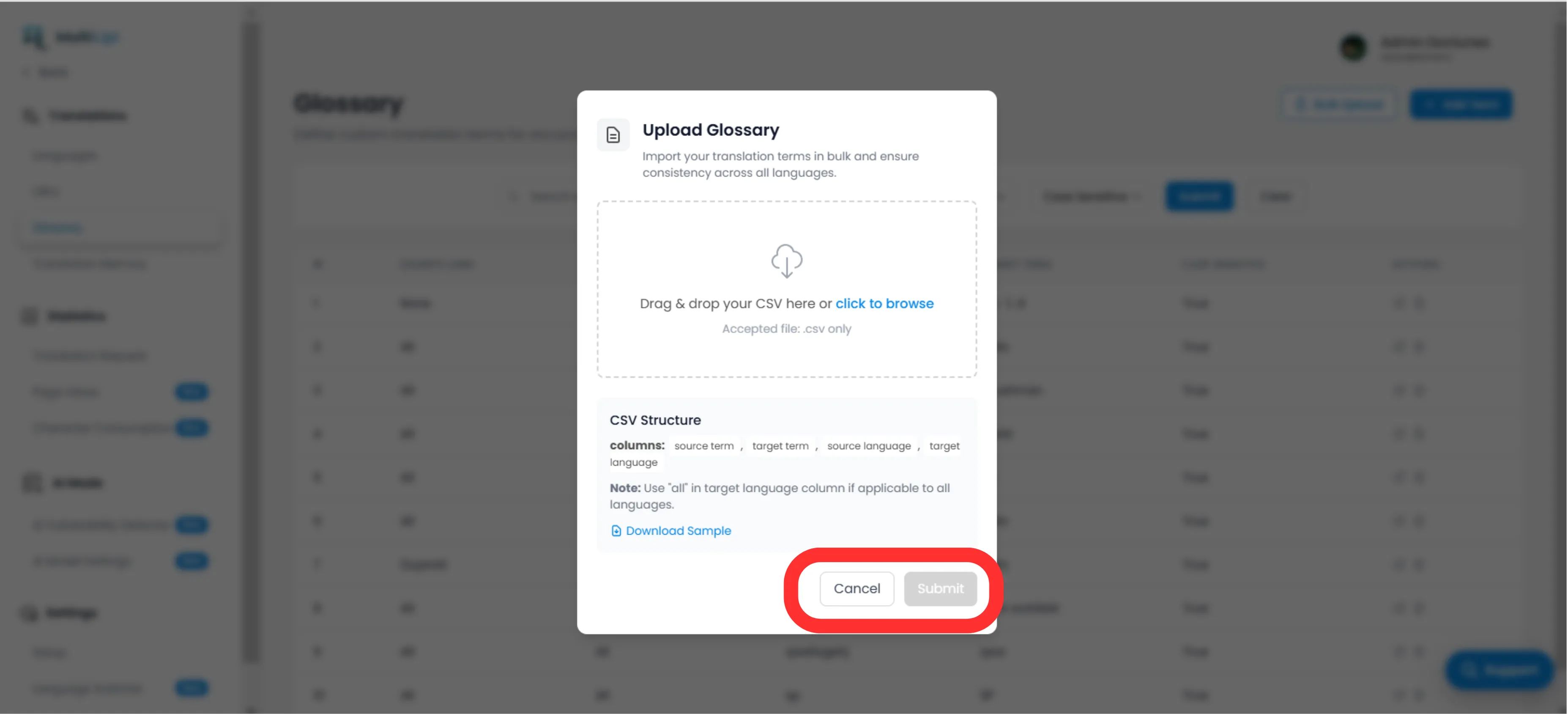
Erstellen Sie eine CSV-Datei mit der folgenden Kopfzeilenstruktur:
source_term, target_term, source_language, target_languageHinweis
Verwenden ISO-Codes für Sprachen (z. B. en, fr, de). Verwenden Sie alle für globale Regeln.
Hochladen
Klicken Sie auf die Hochladen Schaltfläche im Glossar-Panel.
Zuordnen & Validieren
Wählen Sie Ihre Datei aus. Das System wird die Zeilen analysieren und alle Formatierungsfehler kennzeichnen.
Ausführen
Klicken Sie auf Senden um die Regeln in Ihre aktive Terminologiedatenbank zu übernehmen.
Strategische Best Practices
Marke sperren
Die erste Regel, die Sie erstellen sollten, ist für Ihre Firmenname. Setzen Sie das Ziel auf identisch mit der Quelle und anwenden auf Alle Sprachen.
SEO-Schlüsselwörter
Wenn Sie ein bestimmtes Ziel haben hochvolumige Schlüsselwörter in Deutschland (z. B. "Handy" anstatt "Mobiltelefon"), erstellen Sie eine Glossarregel, um die Engine zu zwingen, den Begriff mit höherem Traffic zu verwenden.
Halten Sie es kurz
Glossare eignen sich am besten für 1-3-Wort-Phrasen. Verwenden Sie sie nicht für ganze Sätze, sondern verwenden Sie die Translation Memory or Visueller Editor dafür.
Bereit, Markenkonsistenz durchzusetzen? Öffnen Sie den Glossar-Manager und definieren Sie noch heute Ihre Übersetzungsleitplanken.