
Nicht jeder Pixel Ihrer Website benötigt eine Lokalisierung. Rechtliche Haftungsausschlüsse müssen oft in der Sprache ihrer ursprünglichen Gerichtsbarkeit verbleiben; Code-Schnipsel müssen auf Englisch bleiben; Und Verwaltungsrouten sollten niemals indexiert werden.
MultiLipi bietet eine Dreistufiges Ausschlusssystem —URL, Block und Word – was dir chirurgische Präzision darüber gibt, was die KI ignoriert.
Die drei Ausschlussstufen
Bevor du Regeln konfigurierst, solltest du wissen, welches Maß an Kontrolle du brauchst:
Seitenebene (URL-Regeln)
Action: Das deaktiviert die Übersetzung für eine ganze Seite oder ein Verzeichnis komplett.
Anwendungsfall: Verwaltungsgremien ( /app/* ), Benutzereinstellungen oder "rechtlich bindende" englische Nutzungsbedingungen.
Komponentenebene (Blockregeln)
Action: Ignoriert Inhalte innerhalb bestimmter HTML-Elemente (Divs, Spans) basierend auf ihrer CSS-Klasse.
Anwendungsfall: Codeblöcke ( <pre>), Eigennamen in Headern oder komplexen Drittanbieter-Widgets.
Term-Level (Wortregeln)
Action: Verhindert, dass bestimmte Zeichenkettenübereinstimmungen verarbeitet werden.
Anwendungsfall: Produktmodellnummern oder nicht übersetzbarer Fachjargon.
Zugriff auf die Governance Engine
Um deine negative Logik zu definieren:
- Navigieren: Öffnen Sie Ihr MultiLipi-Dashboard und wählen Sie Ihr aktives Projekt aus.
- Lokalisierungen: Scrolle in der Seitenleiste nach unten zu Einstellungen und wählen Sie Ausschlüsse für Übersetzungen .
- Benutzeroberfläche: Sie sehen eine Liste aktiver Regeln, die nach Kategorie (URLs, Blöcke, Wörter) getrennt sind.
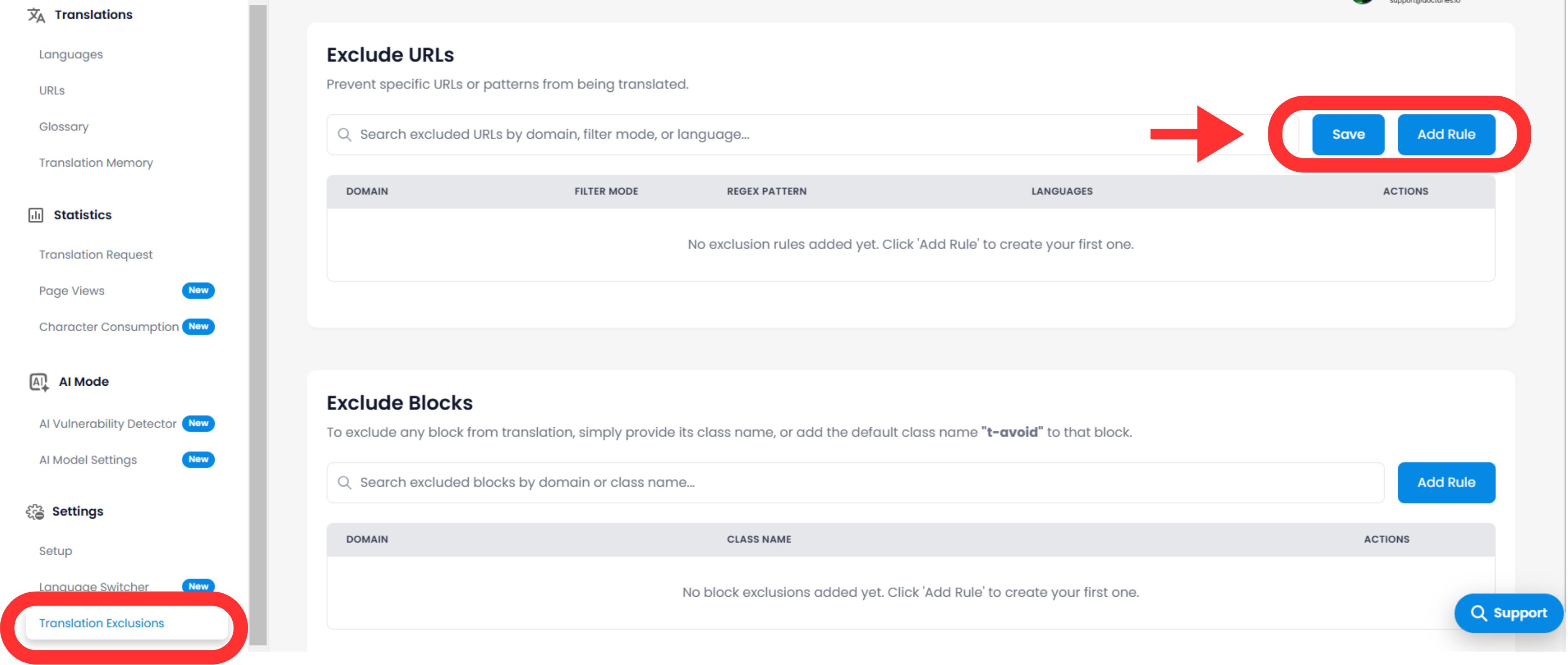
Konfiguration von Logikregeln
Klicken Sie auf das Symbol Regel hinzufügen Button, um eine neue Einschränkung zu definieren.
A. Definition des Musters
Sie müssen der Engine sagen, wie sie den Inhalt abgleichen soll:
Regeltyp:
- • Beginnt mit: Am besten für Verzeichnisse (z. B.
/blog/schließt alle Blogbeiträge aus). - • Endet mit: Am besten für Dateitypen (z. B.
.pdf). - • Enthält: Wildcard-Übereinstimmung für jede URL, die eine bestimmte Zeichenkette enthält.
- • Genaues Match: Zielt auf eine einzelne spezifische Seite.
Wert:
Geben Sie den Pfad ein, CSS-Klassenname (ohne das . ), oder Wort.
B. Umfang & Verhalten
Sprachen:
Wenden Sie die Regel global an ( Alle Sprachen ) oder es auf bestimmte Orte beschränken (z. B. Ausschließen /Auszeichnung nur auf Französisch).
Switcher-Sichtbarkeit (kritische UX)
Umschalten: "Sprachwechsel ausblenden"
Aufprall: Wenn du eine Seite ausschließt (wie einen Login-Bildschirm), möchtest du wahrscheinlich den Sprachwechsel auf dieser Seite ausblenden, damit Nutzer nicht versuchen, die Sprache zu wechseln und nichts passiert. Dieser Schalter automatisiert diese UX-Bereinigung.
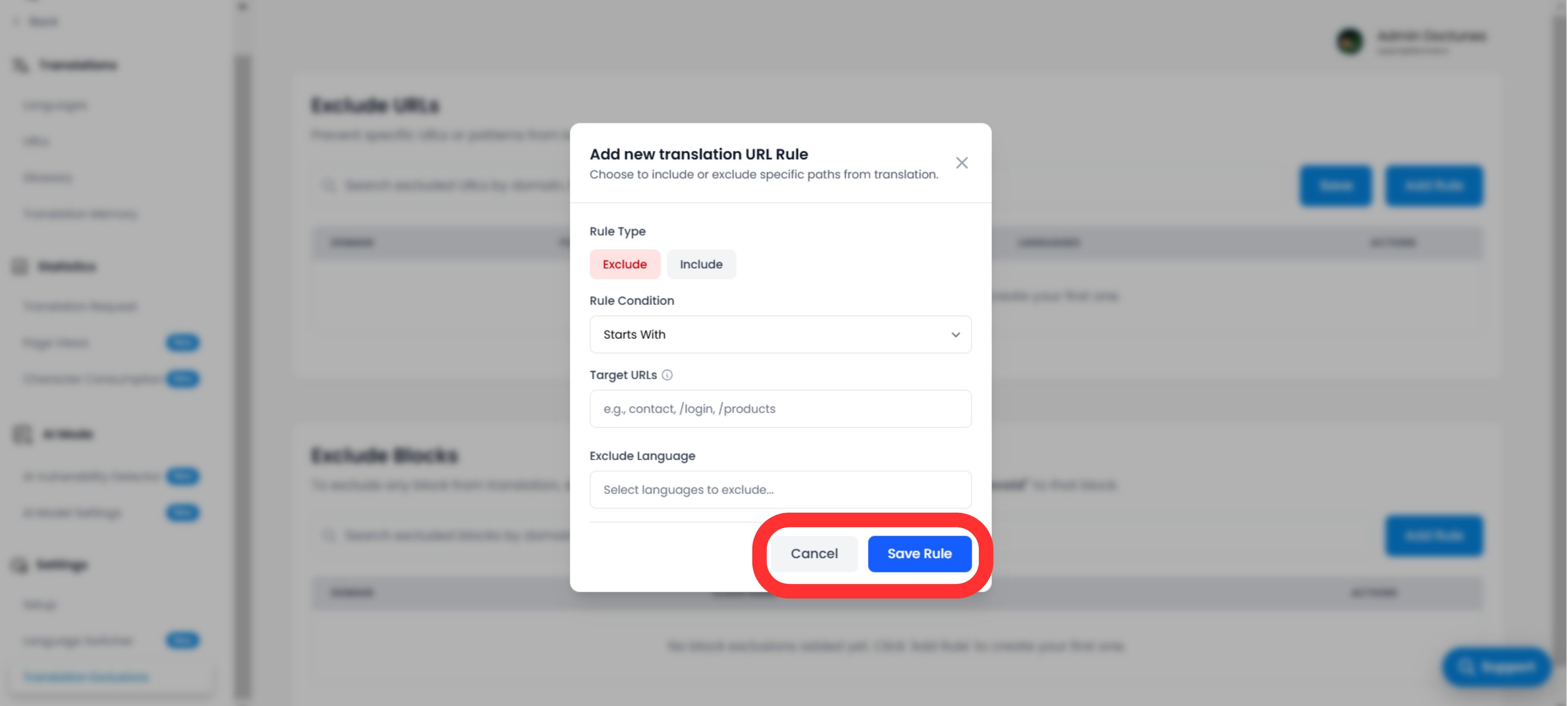
Ausführung und Verifikation
Sobald Sie auf Speicherregel :
Sofortige Verbreitung
Die Regel wird sofort ins Randnetzwerk übertragen.
Cache Purge
Wir löschen automatisch den Cache der betroffenen Pfade, um sicherzustellen, dass die "Unübersetzte" Version sofort bereitgestellt wird.
Strategische Anwendungsfälle
| Typ der Regel | Szenario | Konfiguration |
|---|---|---|
| URL-Regel | Benutzer-Dashboard: Du willst, dass die öffentliche Seite übersetzt wird, aber die angemeldete App ( /app/... ) um auf Englisch zu bleiben. | Typ: Beginnt mit Wert: /app/ |
| Blockregel | Code-Schnipsel: Du betreibst einen Entwicklerblog und möchtest den Tutorial-Text übersetzt haben, aber die Codebeispiele müssen gültig bleiben. | Typ: CSS-Klasse Wert: Code-Snippet |
| URL-Regel | Regionale Rechtsabteilung: Ihre Nutzungsbedingungen gelten nur auf Englisch. | Typ: Genaue Übereinstimmung Wert: /Bedingungen |