
Um eine wirklich lokalisierte Version Ihrer Website bereitzustellen (z. B. hi.yoursite.com für Hindi), benötigt MultiLipi einen DNS-Handshake. Durch die Erstellung eines spezifischen CNAME-Eintrags autorisieren Sie unsere Infrastruktur, den Datenverkehr für diese spezifische Sprach-Subdomain zu verwalten, während Ihre Hauptseite auf Ihrem ursprünglichen Server unverändert bleibt.
Diese Anleitung beschreibt die CNAME-Injektionsprotokoll erforderlich, um Ihre Sprachen live zu schalten.
1. Die Routing-Architektur
Verständnis des Ablaufs.
Ihre Hauptdomain
example.com
→ Zeigt auf Ihr Server (Shopify/Webflow/WordPress)
Die Sprach-Subdomain
hi.example.com
→ Zeigt auf MultiLipi-Übersetzungs-Engine
Wir erreichen dieses Split-Routing mit einem CNAME (Canonical Name) Eintrag. Dieser fungiert als Verkehrsschild und teilt Browsern mit: "Für die Hindi-Version gehen Sie zu MultiLipi."
2. Schritt 1: Bereitstellung des Endpunkts
Bevor Sie Ihre DNS-Einstellungen ändern, müssen Sie das eindeutige Ziel generieren.
Dashboard aufrufen:
Melden Sie sich bei MultiLipi an und wählen Sie Ihr Projekt aus.
Navigation zur Einrichtung:
Gehen Sie zu Neues Projekt.
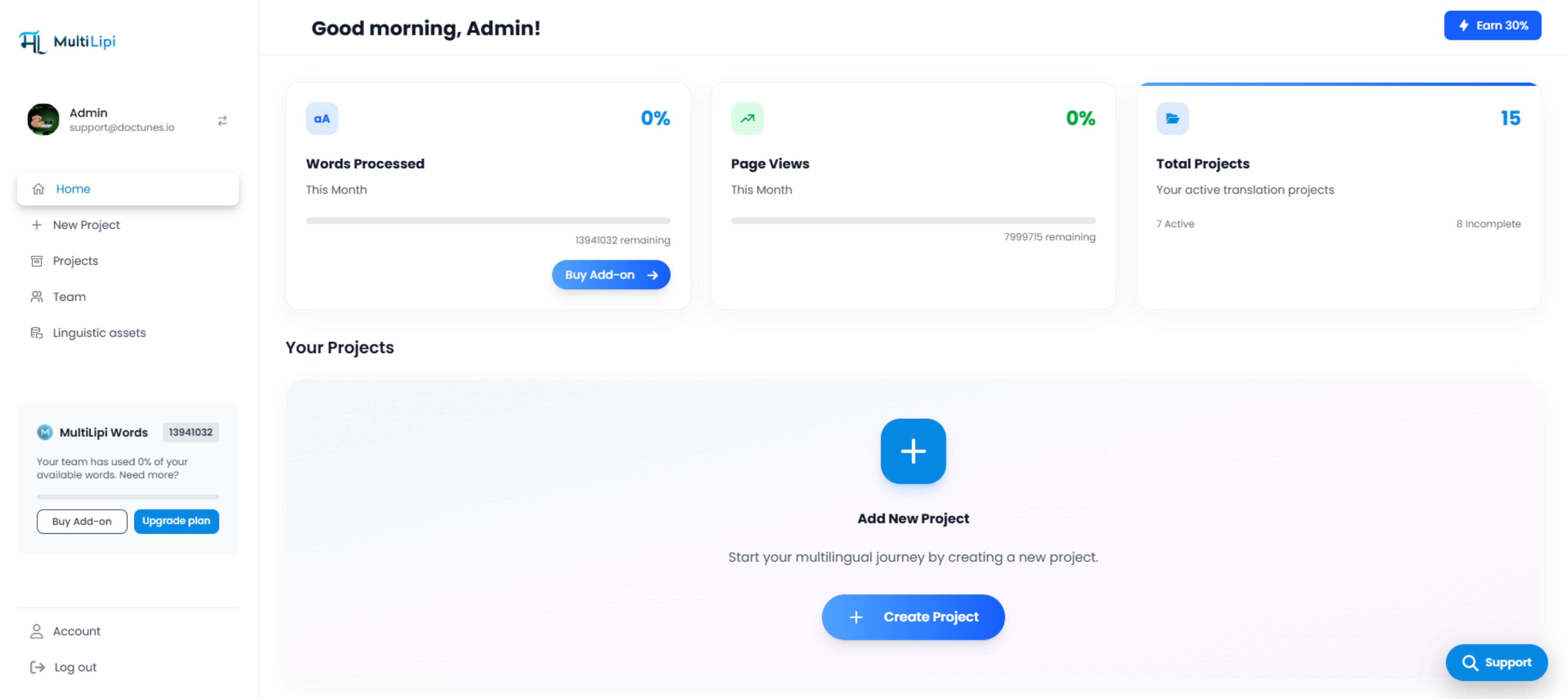
MultiLipi-Dashboard mit der Benutzeroberfläche "Neues Projekt hinzufügen"
Sprachen auswählen:
Wählen Sie die Sprachen aus, die Sie bereitstellen möchten (z. B. Hindi, Französisch).
Werte generieren:
Das System gibt für jede Sprache ein eindeutiges Host- und Wertpaar aus.
Beispielausgabe:
himultilipi.centralindia.cloudapp.azure.comHinweis: Ihr spezifischer Endpunkt kann je nach Region variieren.
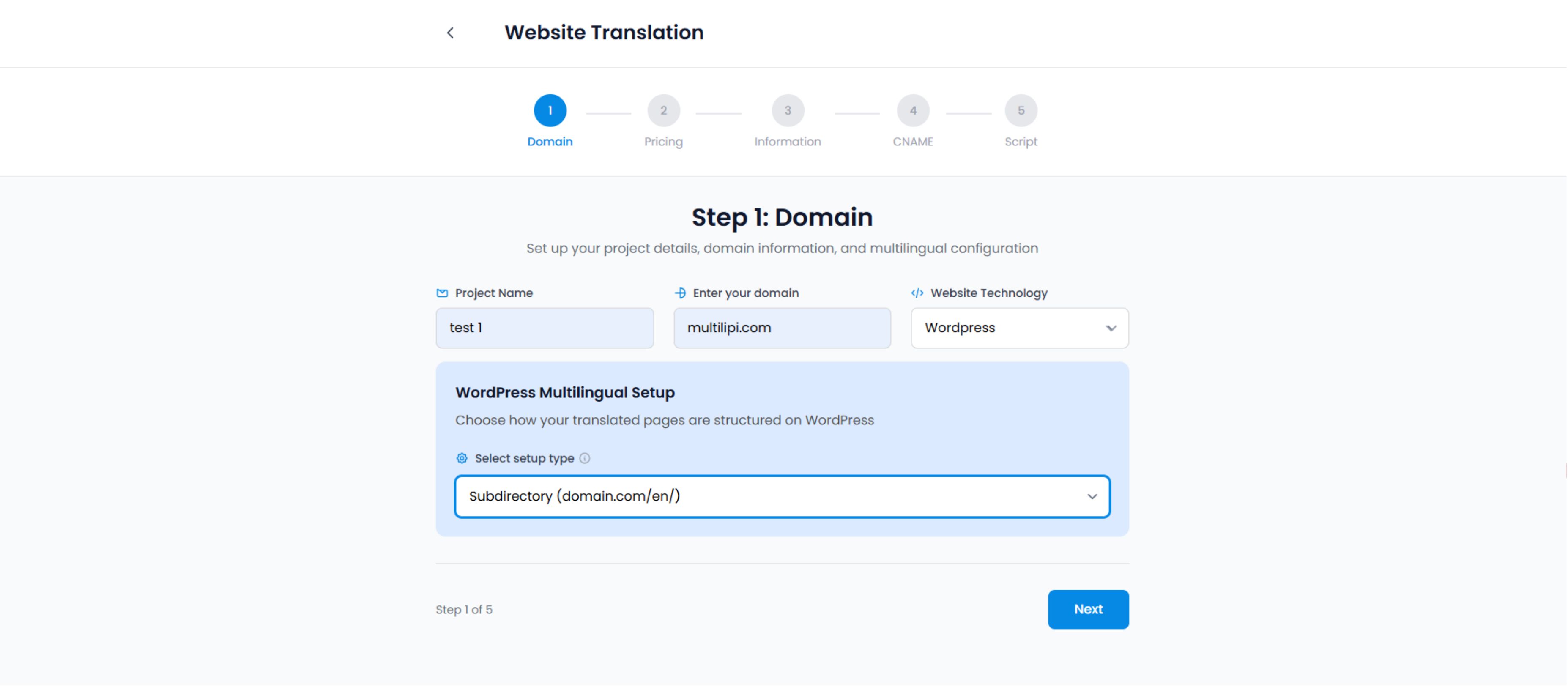
Einrichtungsassistent für Website-Übersetzung – Schritt zur Domainkonfiguration
3. Schritt 2: DNS-Injektion (Registrar-Seite)
Melden Sie sich bei Ihrem DNS-Anbieter an und greifen Sie auf das DNS-Verwaltungs-Panel zu.
Melden Sie sich bei Ihrem DNS-Anbieter (GoDaddy, Cloudflare, Namecheap, Route53) an und greifen Sie auf die DNS-Verwaltung Panel.
Die Eintragskonfiguration:
Sie müssen für jede Sprache, die Sie auf einer Subdomain bereitstellen möchten, einen separaten Eintrag hinzufügen.
| Eintragstyp | Name / Host | Wert / Ziel | TTL |
|---|---|---|---|
| CNAME | hi | [Wert vom Dashboard einfügen] | 1/2 Stunde (oder Automatisch) |
| CNAME | fr | [Wert vom Dashboard einfügen] | 1/2 Stunde (oder Automatisch) |
Typ: Wählen Sie immer CNAME.
Name: Der Sprachcode (z. B. hi, fr).
Wert: Der Azure-Endpunkt, der in Ihrem Dashboard angegeben ist (z. B. multilipi.centralindia.cloudapp.azure.com).
TTL (Time to Live): Stellen Sie auf 1/2 Stunde oder Automatisch ein, um eine schnelle Verbreitung zu gewährleisten.
⚠️ Wichtig für Cloudflare-Benutzer:
Wenn Sie Cloudflare verwenden, müssen Sie ausschalten AUS die "Orange Cloud" (Proxy-Status) für diese spezifischen CNAME-Einträge. Setzen Sie sie auf "Nur DNS" (Graue Wolke). MultiLipi kümmert sich um SSL und Caching für diese Subdomains; eine doppelte Weiterleitung verursacht oft SSL-Fehler.
4. Schritt 3: Weiterleitung & Verifizierung
DNS-Änderungen sind nicht immer sofortig. Sie müssen sich im globalen Internet verbreiten.
Warten:
Die Weiterleitung dauert normalerweise 15-30 Minuten (kann aber bis zu 24 Stunden dauern).
Im Dashboard überprüfen:
Klicken Sie im MultiLipi-Einrichtungsfenster auf die Schaltfläche "Verifizieren".
Erfolg: Der Statusindikator wird Grün.
Fehler: Das System kann den Eintrag nicht erkennen. Prüfen Sie auf Tippfehler oder Cloudflare Proxy-Einstellungen.
Live-Test:
Besuchen Sie hi.yoursite.com. Sie sollten Ihre Website mit aktiviertem Sprachumschalter sehen.
Fehlerbehebung bei der Handshake
Häufige Probleme und deren Lösungen
SSL-Fehler:
Wenn Sie eine Warnung "Nicht sicher" auf der neuen Subdomain sehen, warten Sie 15 Minuten. MultiLipi stellt automatisch ein verwaltetes SSL-Zertifikat für die Subdomain bereit, sobald der DNS-Eintrag verifiziert ist.
404-Fehler:
Stellen Sie sicher, dass Sie den genauen Zielwert eingegeben haben, der im Dashboard angegeben wurde. Ein einziger Tippfehler wird die Route unterbrechen.