
Kontrollieren Sie Ihre KI-Erzählung
Im Zeitalter von Generative Engine Optimization (GEO), die Titel und Beschreibung Ihrer Seite sind mehr als nur blaue Links bei Google; sie sind die primären "Kontextvektoren" für KI-Modelle. Während MultiLipi diese Assets automatisch übersetzt, die Schema & llms.txt Manager gibt Ihnen die detaillierte Kontrolle, um diese zu überschreiben und sicherzustellen, dass Ihre Markenerzählung in jeder Sprache konsistent ist.
Was Sie kontrollieren werden:
Greifen Sie auf den KI-Hub zu
- 1Melden Sie sich bei Ihrem an MultiLipi Dashboard.
- 2Klicken Sie in der linken Seitenleiste unter dem LLM-OPTIMIERUNG Abschnitt, klicken Sie auf Schema & llms.txt.
- 3Visuelle Prüfung: Sie sehen ein Dashboard, das alle Ihre aktiven Sprachpaare auflistet (z. B. Englisch → Italienisch, Englisch → Deutsch).
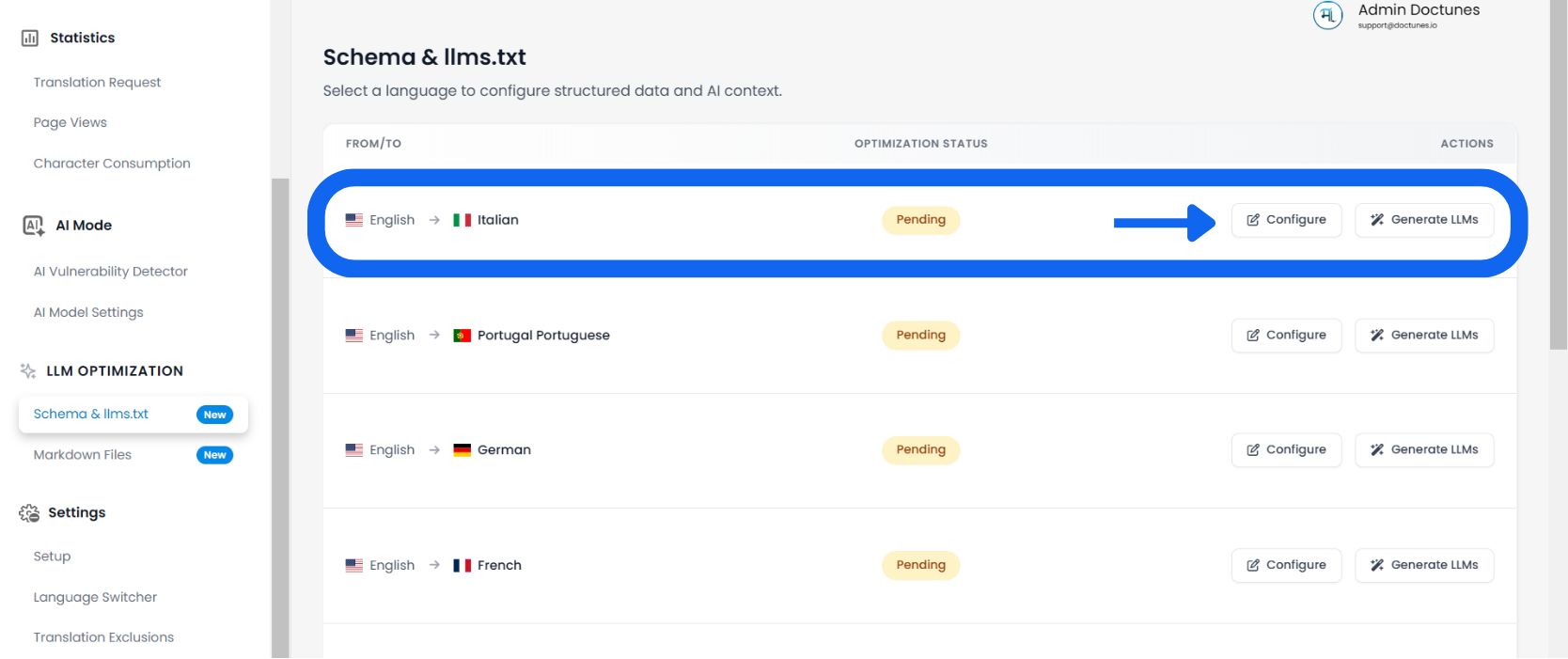
Wählen Sie eine Zielsprache
Überprüfen Sie die Optimierungsstatus Spalte (z. B. „1 % optimiert“ oder „Ausstehend“), um zu sehen, welche Sprachen Aufmerksamkeit benötigen.
Audit-Seitenmetadaten
Das System lädt eine detaillierte Liste jeder URL, die auf Ihrer Website für diese Sprache gefunden wurde.
Spalten überprüfen:
Der spezifische Seiten-Slug (z. B. /aeo-guide).
Der aktuell lokalisierte Titel-Tag, der Bots angezeigt wird.
Die lokalisierte Zusammenfassung für die KI-Indexierung.
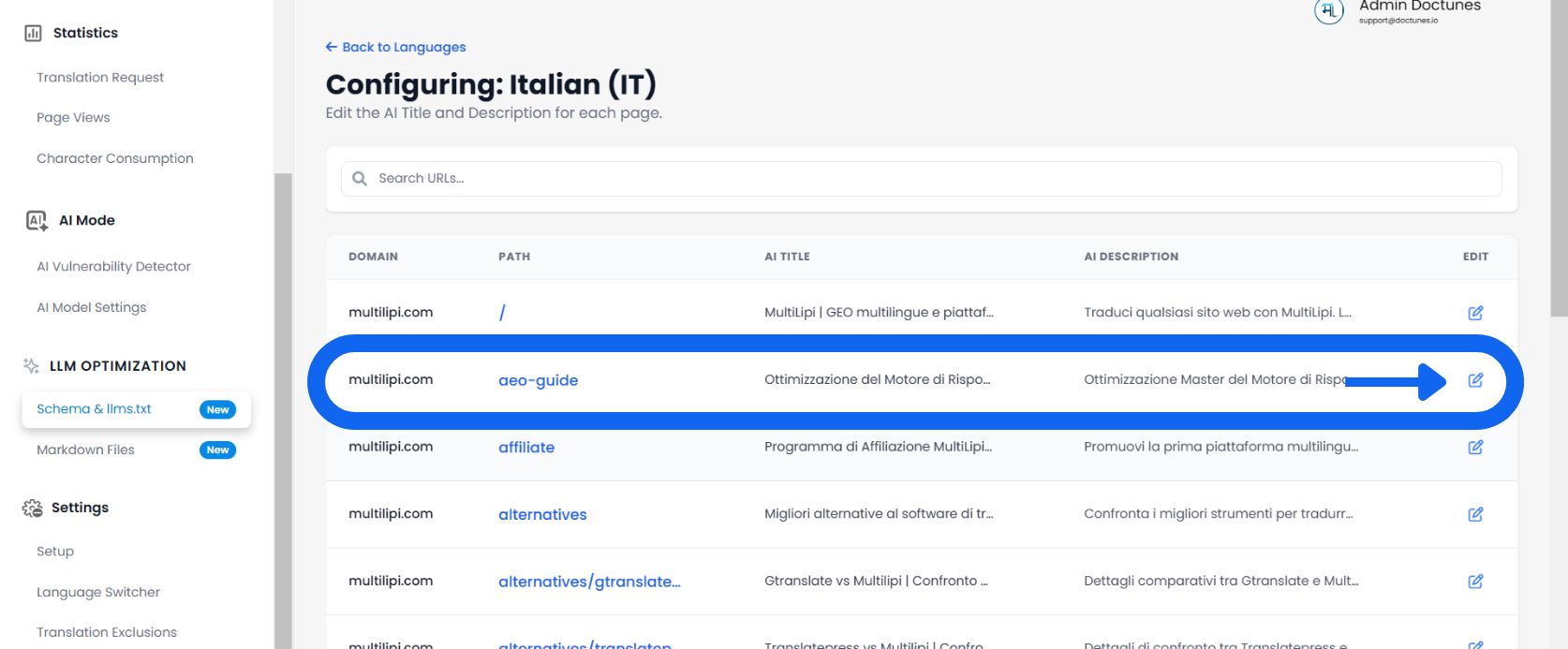
Bearbeiten und Überschreiben
✏️ Wenn die automatisch generierte Übersetzung die Nuancen Ihrer Marke verfehlt, überschreiben Sie sie manuell.
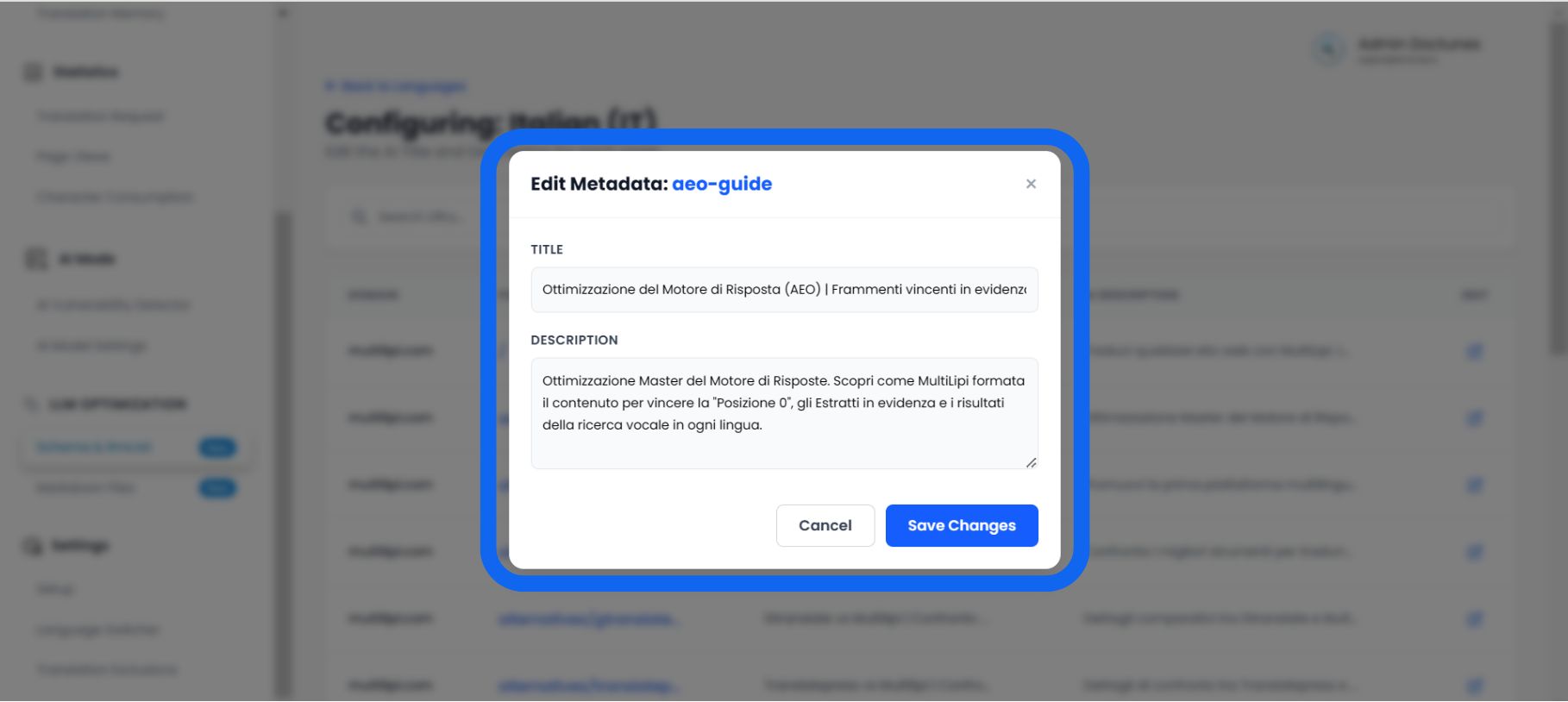
- Klicken Sie auf Bearbeiten:Auswählen Stiftsymbol neben einem beliebigen Titel oder einer Beschreibung.
- Das Editor-Modal:Ein Popup mit dem Titel „Schema-Metadaten bearbeiten“ erscheint.
- Neue Daten eingeben:
• Schema-Titel: Geben Sie einen schlüsselwortreichen, lokalisierten Titel ein.
• Schemabeschreibung: Schreiben Sie eine strukturierte Zusammenfassung (ca. 160 Zeichen), die die Absicht des Benutzers direkt beantwortet.
- Speichern:Klicken Sie auf Änderungen speichern.
Ergebnis: Das System aktualisiert sofort Ihrellms.txtFeed und JSON-LD-Markup mit diesen neuen, kuratierten Daten.
Warum manuelle Kurierung wichtig ist
🎯 Übersetzen Sie nicht nur; optimieren Sie.
Während die automatische Übersetzung zu 95 % genau ist, ist die Schema-Manager ermöglicht es Ihnen, die letzten 5 %, die die Konversion antreiben, zu perfektionieren.
Die „Halluzinationskorrektur“
⚡ Verhindern Sie, dass KI über Ihr Produkt lügt.
KI-Modelle (wie ChatGPT) "halluzinieren" oft Fakten, wenn sie keine klaren Daten haben.
⚠️ Das Risiko
Wenn Ihre automatische Übersetzung der Beschreibung vage ist, kann eine KI bei der Beantwortung einer Benutzerfrage fälschlicherweise Ihre Preise oder Funktionen erraten.
✅ Die Lösung
Durch manuelles Bearbeiten der Schema-Beschreibung in diesem Tool geben Sie eine Zusammenfassung als „Harte Fakten“ an. Dies zwingt die KI, die Ihr geschriebene Definition als Grundlage, was die Wahrscheinlichkeit von Fehlinformationen in KI-generierten Antworten erheblich reduziert.