
In einer globalen Infrastruktur ist Reibung der Feind der Konversion. Wenn ein Benutzer aus Paris Ihre Website besucht, sollte er nicht manuell nach einem Flaggen-Symbol suchen müssen, um auf Französisch umzuschalten. MultiLipis Besucher-Sprachumleitung fungiert als intelligenter Verkehrsregler. Es inspiziert die Anfrage des eingehenden Benutzers Accept-Language Header (Browser-Locale) und leitet den Benutzer sofort zur passenden lokalisierten Version Ihrer Website weiter (z. B. fr.yoursite.com).
Diese Anleitung beschreibt die Konfigurationsprotokoll um diese automatisierte Weiterleitungs-Schicht zu aktivieren.
1. Die Weiterleitungslogik
Wie die Erkennung funktioniert.
Erkennung:
Ein Benutzer landet auf yoursite.com.
Inspektion:
Die Engine liest die Browsereinstellungen (z. B. fr-FR).
Weiterleitung:
Wenn Französisch eine aktive Sprache in Ihrem Projekt ist, führt das System sofort eine 302-temporäre Weiterleitung zur französischen Subdomain durch.
Fallback:
Wenn die Sprache des Benutzers nicht unterstützt wird, bleibt er in der Standard- (Quell-) Sprache.
2. Konfigurationsprotokoll
Aktivieren Sie diese Funktion direkt über das Kontrollzentrum Ihres Projekts.
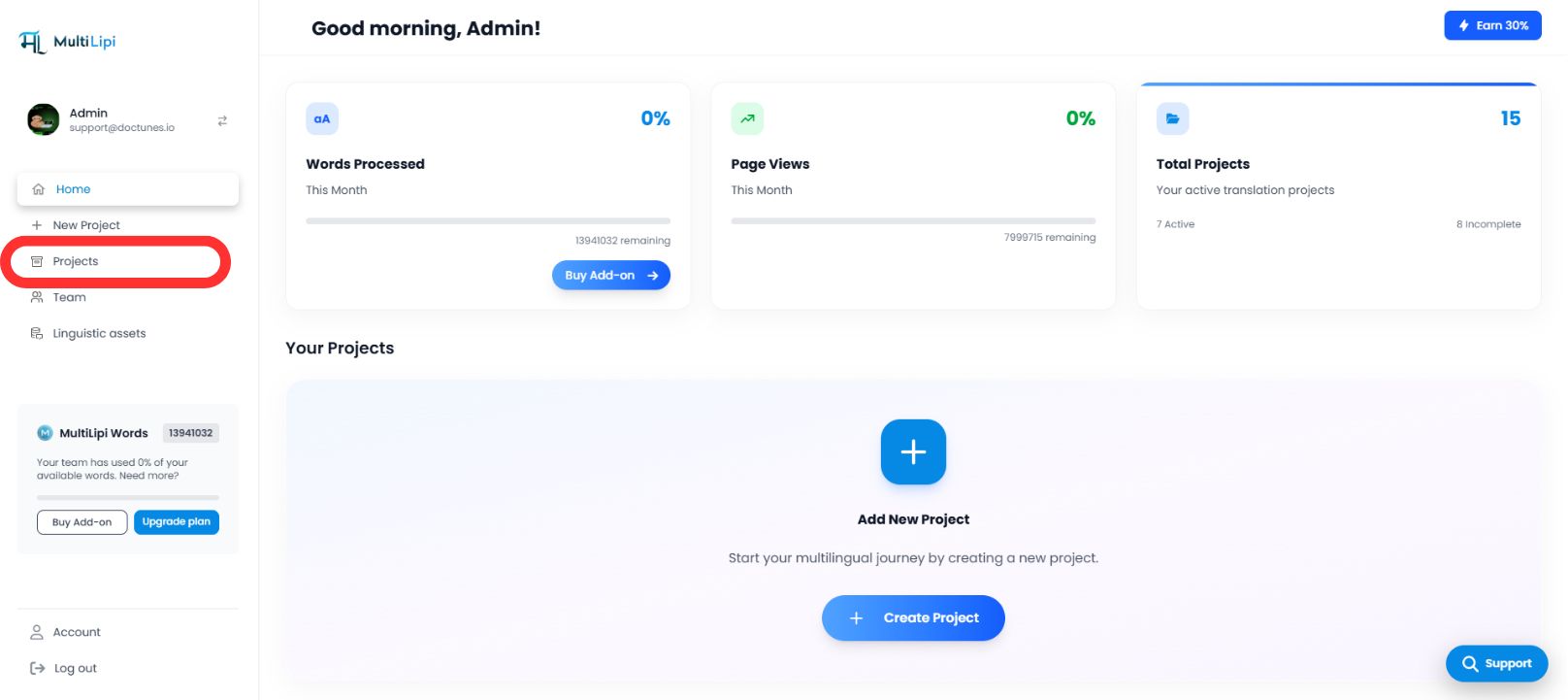
Schritt 1: Zugriff auf das Projekt-Dashboard
- •Melden Sie sich bei Ihrem MultiLipi-Dashboard an.
- •Navigieren Sie zur linken Seitenleiste und klicken Sie auf Projekte um Ihr aktives Portfolio anzuzeigen.
Schritt 2: Zielprojekt auswählen
- •Suchen Sie die spezifische Domain, die Sie konfigurieren möchten.
- •Klicken Sie auf die Projekt-Kachel um auf dessen spezifisches Management-Console zuzugreifen.
Schritt 3: Konfiguration aufrufen
- •Klicken Sie in der linken Seitenleiste der Projektansicht auf Einstellungen.
- •Wählen Sie aus dem Dropdown-Menü oder Untermenü Projekteinstellungen.

Schritt 4: Routing aktivieren
- •Scrollen Sie im Einrichtungsbereich nach unten, bis Sie die "Besucher-Sprachumleitung" Option.
- •Aktion: Schalten Sie den Schalter auf
AN. - •Systemantwort: Die Routing-Engine ist jetzt aktiv. Neue Besucher werden automatisch basierend auf ihren Browserpräferenzen weitergeleitet.
Konfiguration abgeschlossen – Routing-Engine aktiv
3. Strategische Vorteile
Warum diesen Prozess automatisieren?
Reduzierung der Absprungrate:
Benutzer werden weniger wahrscheinlich sofort abspringen wenn sie innerhalb der ersten Sekunde Inhalte in ihrer Muttersprache sehen.
Konversionsgeschwindigkeit:
Das Entfernen des "manuellen Schalters" beschleunigt die User Journey von der Landung bis zum Checkout.
Intelligenter Fallback:
Das System ist nicht aufdringlich; es leitet nur weiter, wenn eine passende Übersetzung vorhanden ist, sodass kein Benutzer jemals auf eine Sackgasse stößt.
Das Fazit:
Automatische Sprachumleitung verwandelt Ihre Website von einem passiven Übersetzungsportal in eine intelligente Lokalisierungsmaschine die die Bedürfnisse der Nutzer antizipiert, noch bevor sie klicken.